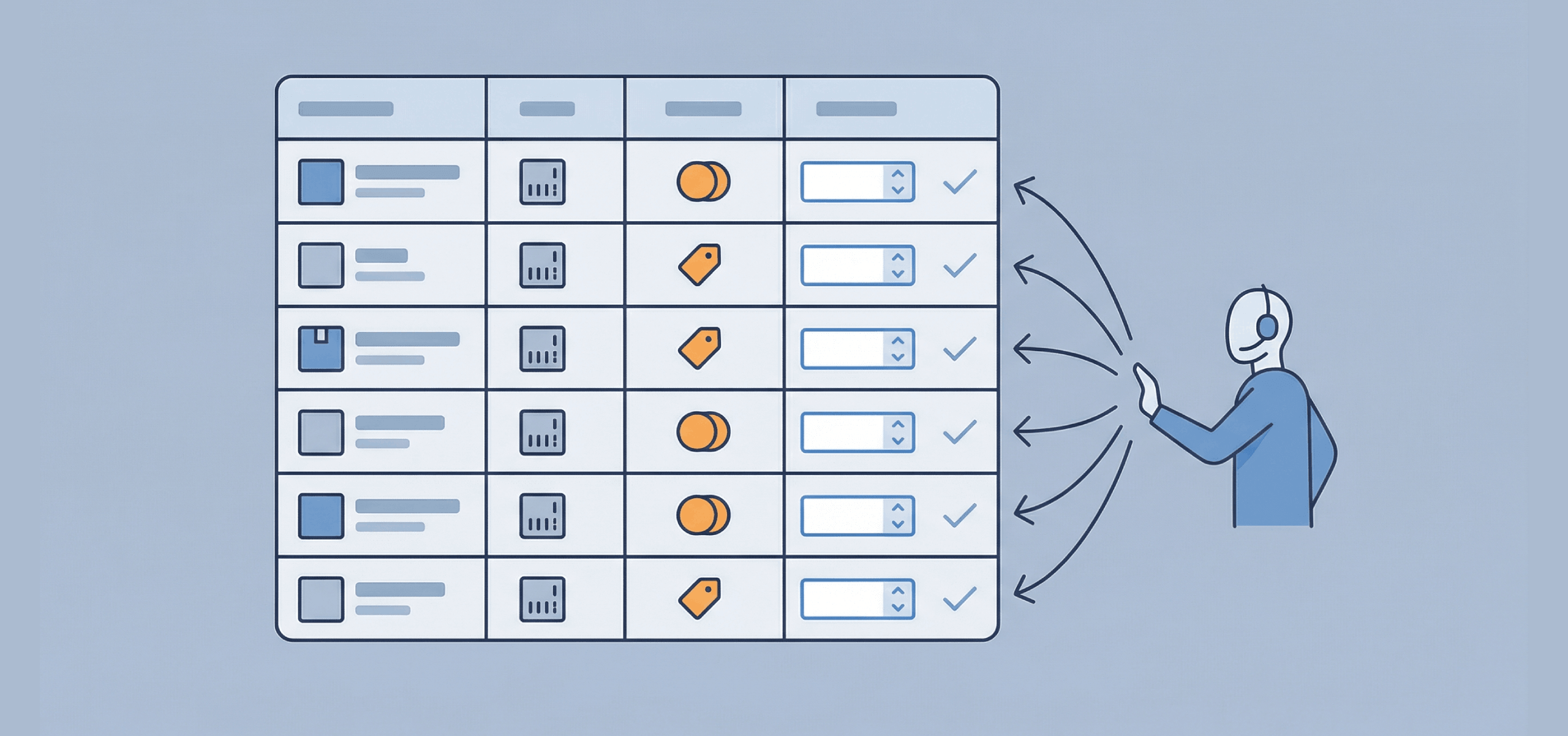
A product table is one of the simplest ways to make wholesale, B2B, and bulk ordering faster and easier for both your customers and your team.
If you sell to trade buyers, resellers, or customers who regularly place large orders, standard product pages can quickly become a bottleneck. Clicking in and out of individual products, adjusting quantities one by one, and trying to compare similar items all slow things down. For buyers who already know what they want, this kind of setup feels inefficient.
This guide is here to help you fix that. We’ll show you how product tables work, why they are so effective for wholesale and B2B sales, and how to use them to support real buying behaviour.
In this article, we’ll cover:
- What a product table is and when it makes sense to use one.
- How product tables support wholesale, B2B, and bulk ordering.
- What information to include so buyers can order quickly and accurately.
- How this setup works in WordPress and WooCommerce, using WooCommerce Product Tables.
By the end, you’ll have a clear understanding of when a product table is the right choice, how to structure it properly, and how it can reduce friction for customers placing larger or repeat orders.
We’ll start with the basics and look at what a product table is and when you should use one.
What is a product table and when should you use one?
A product table displays multiple products in a simple, table-style layout, allowing customers to view, compare, and order items from a single page.
Instead of clicking through individual product pages, buyers can scan key details, enter quantities, and add several products to their cart at once. This makes product tables a strong fit for wholesale, B2B, and bulk ordering, where speed matters more than detailed browsing.
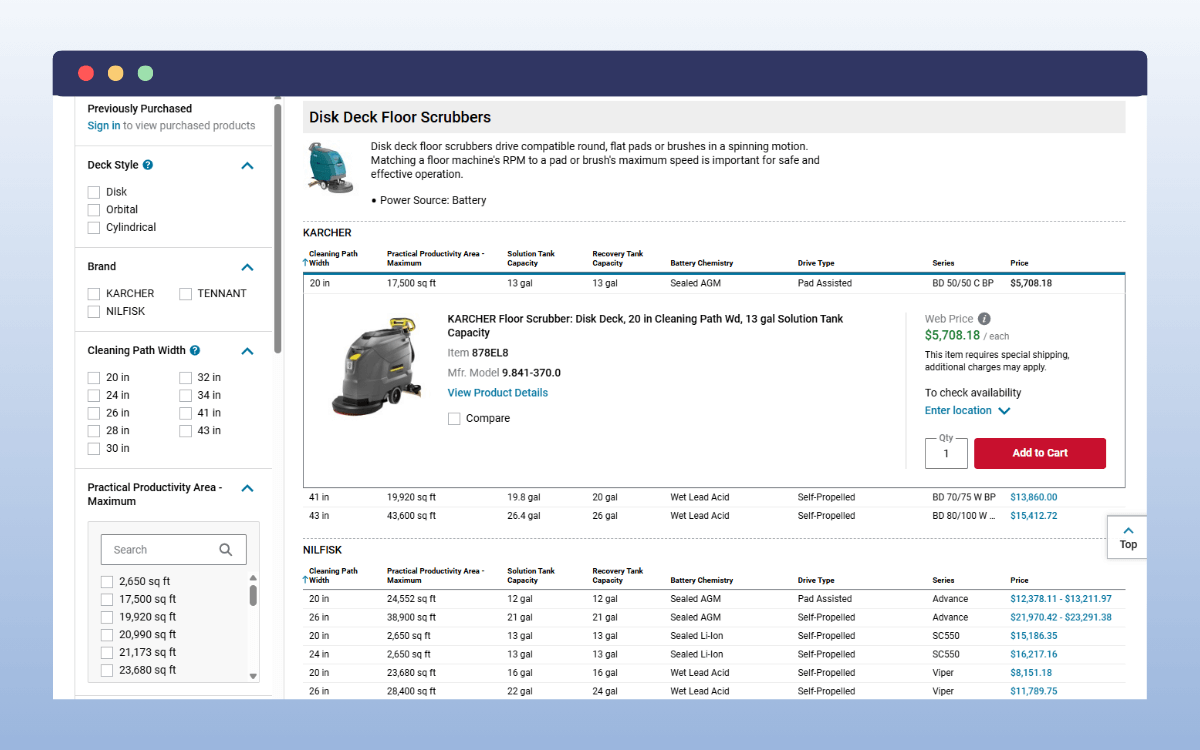
In practical terms, a product table replaces multiple product listings or category pages with a single, structured table layout. Everything happens on one page, products are displayed in rows, and buyers interact directly with quantities, variations, and add to cart options without navigating away.
Many stores use product table templates to create consistent ordering pages, especially for wholesale catalogues or bulk order forms. This one-page approach reduces friction and makes the ordering process feel more like an easy-to-use spreadsheet than a traditional ecommerce storefront.
When product tables work best
Product tables are most effective when:
- Customers place large or repeat orders.
- Multiple products or variations are ordered at once.
- Speed and accuracy matter more than product storytelling.
They are commonly used for wholesale ordering, B2B catalogues, bulk purchases, and internal ordering systems. Many stores use both. Product pages support discovery, while product tables support fast, high-volume ordering.
Next, we’ll look at why product tables work so well for wholesale, B2B, and bulk orders.

Why do product tables work well for wholesale and B2B ordering?
Product tables are designed around how wholesale and B2B customers actually buy. These buyers are rarely browsing for inspiration. They usually know the products, the SKUs, and the quantities they need, and they want to place an order with as little friction as possible.
Faster ordering with fewer clicks
One of the biggest advantages of a product table is speed. Buyers can enter quantities for multiple products on a single page and add them all to the cart in a single click.
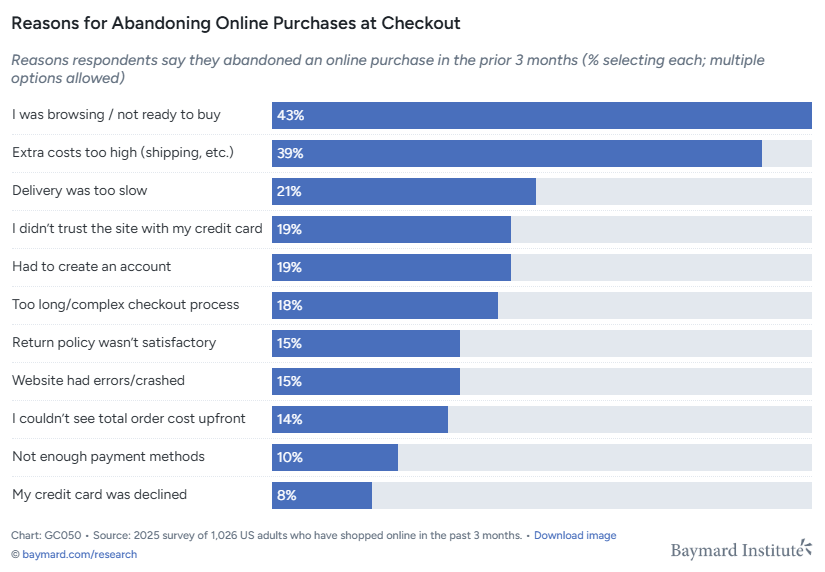
Research from Baymard Institute shows that reducing unnecessary steps in the buying flow directly impacts completion rates. Product tables eliminate unnecessary page loads and reduce the number of clicks required to place an order.
Easier comparison of pricing and SKUs
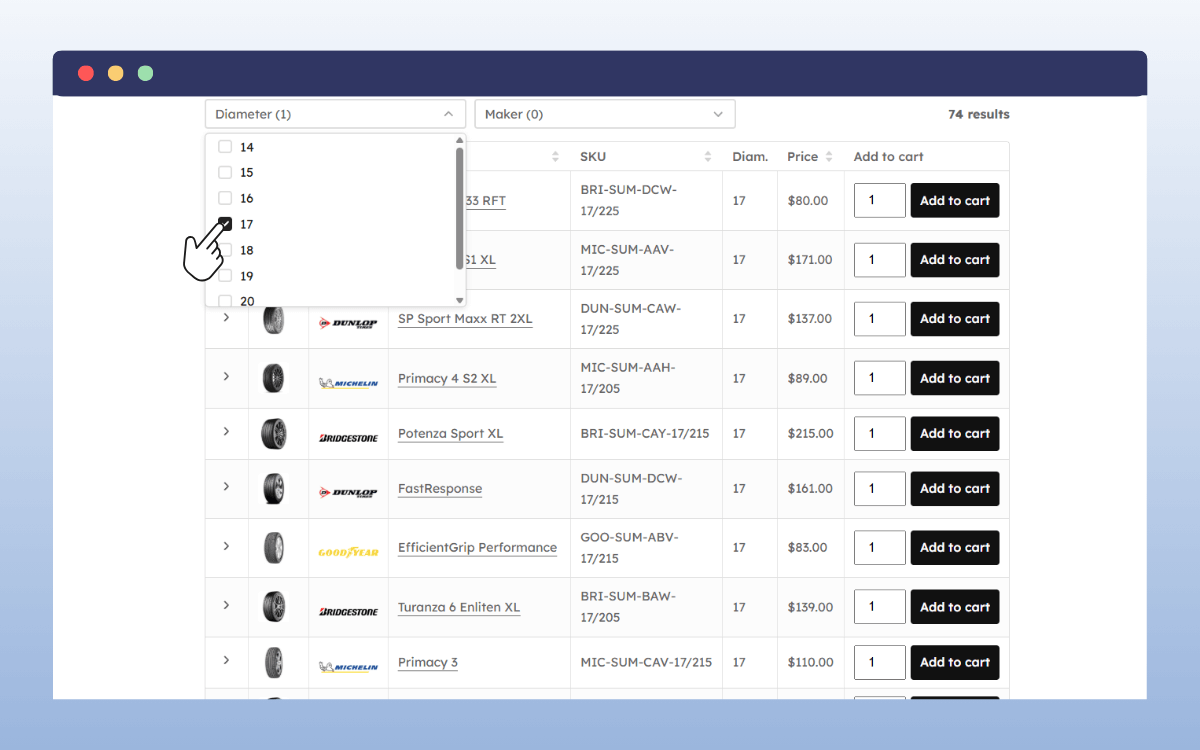
Wholesale and B2B buyers often need to compare products side by side. Product tables make this straightforward by showing consistent information across rows.
This makes it easier to:
- Compare prices or price tiers.
- Check SKUs and product codes.
- Review variations, sizes, or formats without opening multiple pages.
Having this information readily available reduces mistakes and speeds up decision-making.
Add multiple products to the cart at once
Product tables allow customers to add several items to their cart in a single step. This is especially useful for bulk orders or restocking.
Instead of repeating the same process for each product, buyers can build an entire order at once. This mirrors how many B2B customers already work, often using spreadsheets or order forms offline.
A better experience for repeat buyers
Repeat customers value efficiency. They do not need long descriptions or large images each time they order.
A product table gives them a predictable, repeatable way to buy. Over time, this consistency builds trust and reduces friction, which can increase reorder frequency.
What should a good product table include?
A good product table focuses on ease of use and speed. Every column should help buyers complete an order with fewer mistakes and in less time.
Below are the core elements that make a product table effective for wholesale, B2B, and bulk ordering.
Essential product table elements
| Table element | Why it’s needed |
|---|---|
| Product name and SKU | Helps buyers quickly identify the correct item, especially when ordering from a price list or purchase order. |
| Pricing | Clear pricing, including any trade or tiered prices, allows buyers to compare options without leaving the page. |
| Quantity input | Lets customers enter exact quantities for each product, which is critical for bulk orders. |
| Add to cart option | Allows single or bulk add-to-cart actions so buyers can build an order in one step. |
| Product variations | Dropdowns or checkboxes make it easy to select sizes, colours, or formats without opening new pages. |
| Clear table layout | Logical column order and consistent spacing reduce errors and improve scanability. |
Pricing, quantity, and add to cart behaviour
Pricing and quantity controls are where product tables do most of their work. Wholesale and B2B buyers need to see prices clearly and add products to their cart without second-guessing things.
A well-designed product table should:
- Display pricing clearly, including any bulk or tiered pricing.
- Place quantity fields close to prices to reduce scanning time.
- Use a clear Add to cart action for individual rows or bulk selections.
- Support checkboxes where customers need to select multiple products quickly.
Product variations: how to handle them
Variations are often the most complex part of wholesale ordering. A good product table keeps this simple with:
- Dropdowns for size, colour, or format.
- Separate rows for each variation when clarity matters.
- Checkboxes for selecting multiple variations quickly.
The right approach depends on how many variations you offer and how your customers typically order.
Layout and column choices
Avoid overloading your table with unnecessary data. Too many columns slow buyers down and make scanning harder.
As a general rule:
- Lead with product name and SKU.
- Place pricing and quantity inputs close together.
- Keep Add to cart actions consistent across rows.
If a column doesn’t help customers identify, compare, or order a product faster, it probably doesn’t need to be there.
How can you build product tables on a WordPress and WooCommerce site?
WooCommerce is a popular choice for stores that sell wholesale, B2B, or bulk products. It’s flexible, well-supported, and works with a wide range of e-commerce setups. However, its default layout is built around individual product pages rather than fast, table-based ordering.
WooCommerce doesn’t include product tables by default. Because of this, stores that need bulk or wholesale ordering usually rely on a product table plugin to create the right experience for their customers.
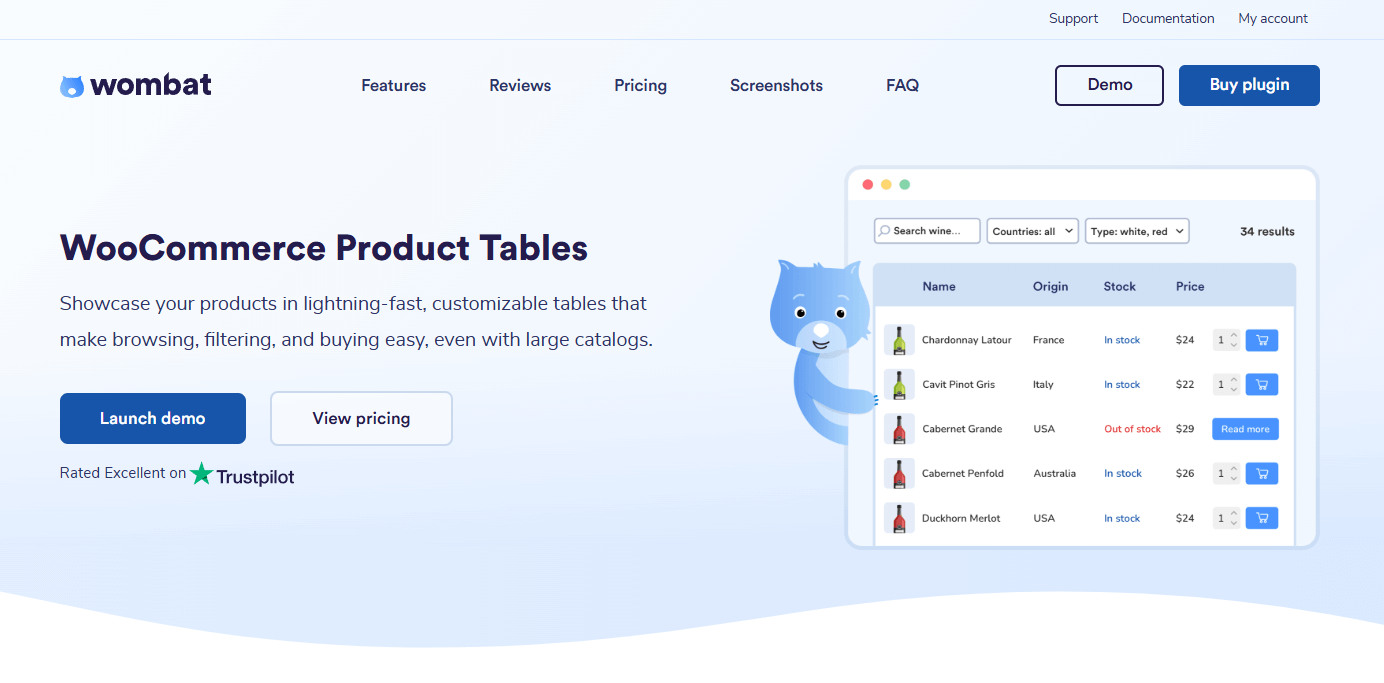
Using a product table plugin in WooCommerce
A product table plugin extends WooCommerce by adding a new way to display and order products. Instead of browsing one product at a time, customers can view multiple products in a single table, enter quantities, and add everything to their cart at once.
For WordPress sites, WooCommerce Product Tables is a great choice. It’s designed specifically for wholesale and B2B ordering, where speed and ease of use matter most.
It allows you to:
- Display products in a clean, table-style layout.
- Show only the most relevant product details, such as SKUs, prices, and stock.
- Handle variable products without sending customers to separate pages.
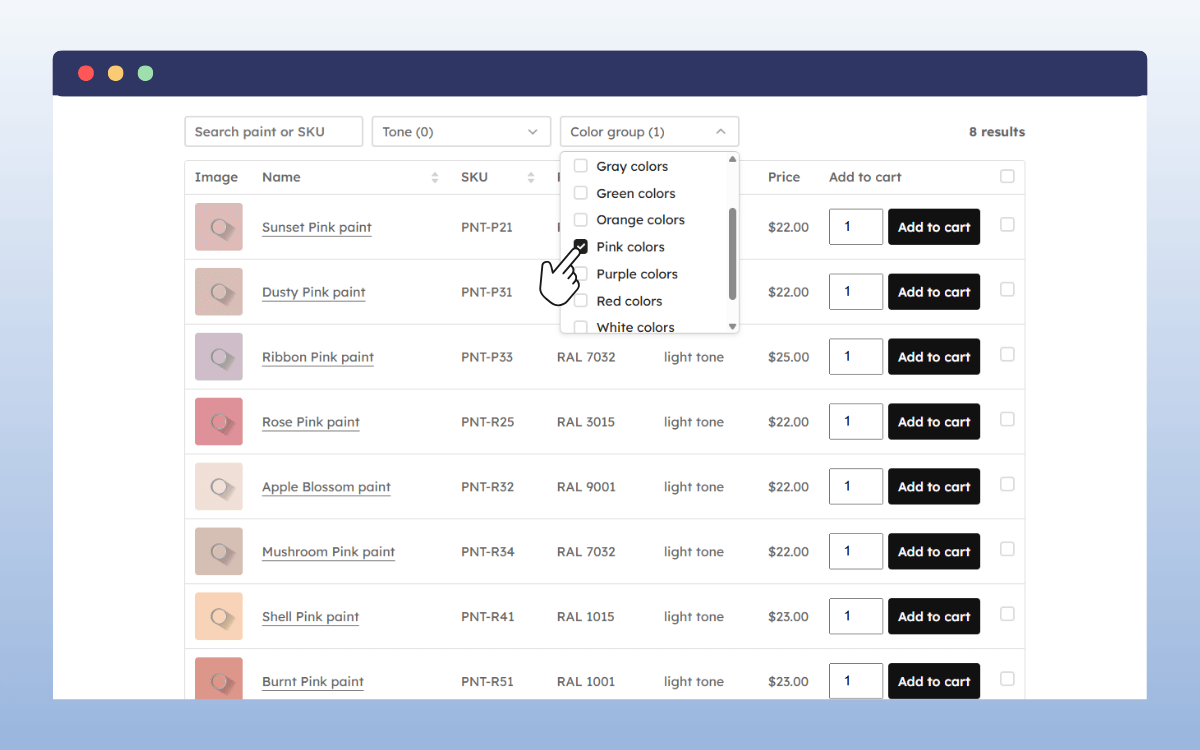
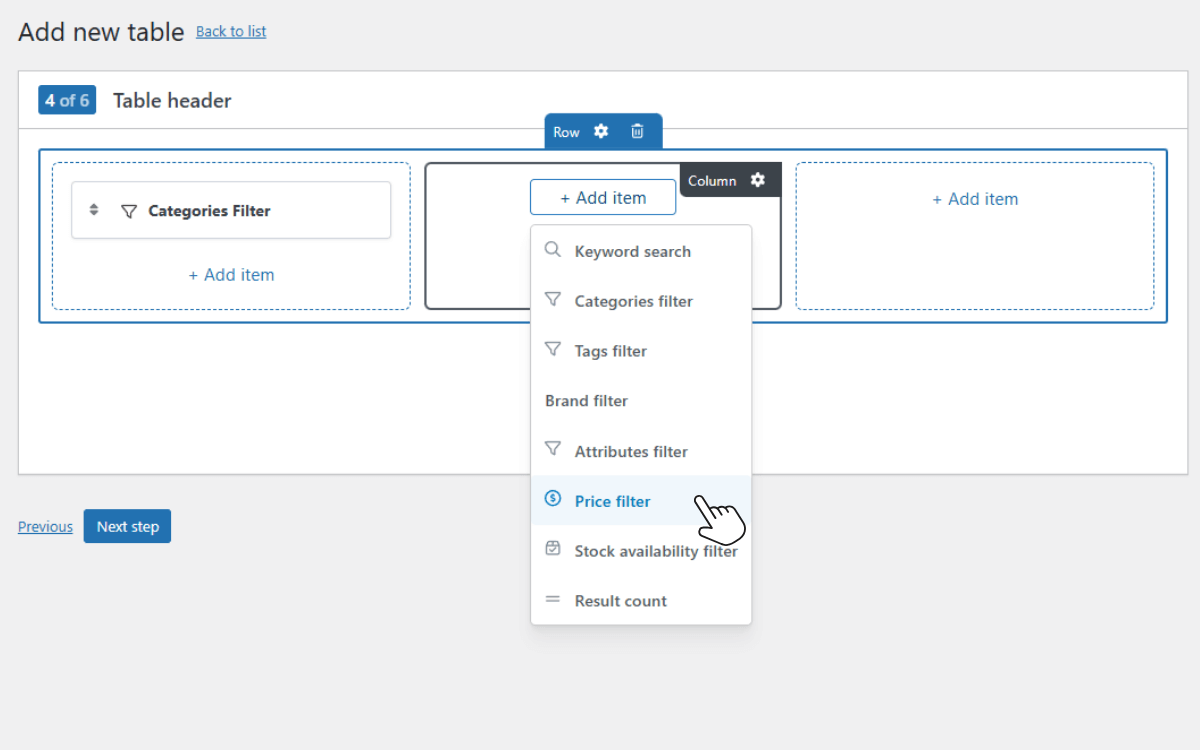
- Add search and filters so buyers can find products quickly.
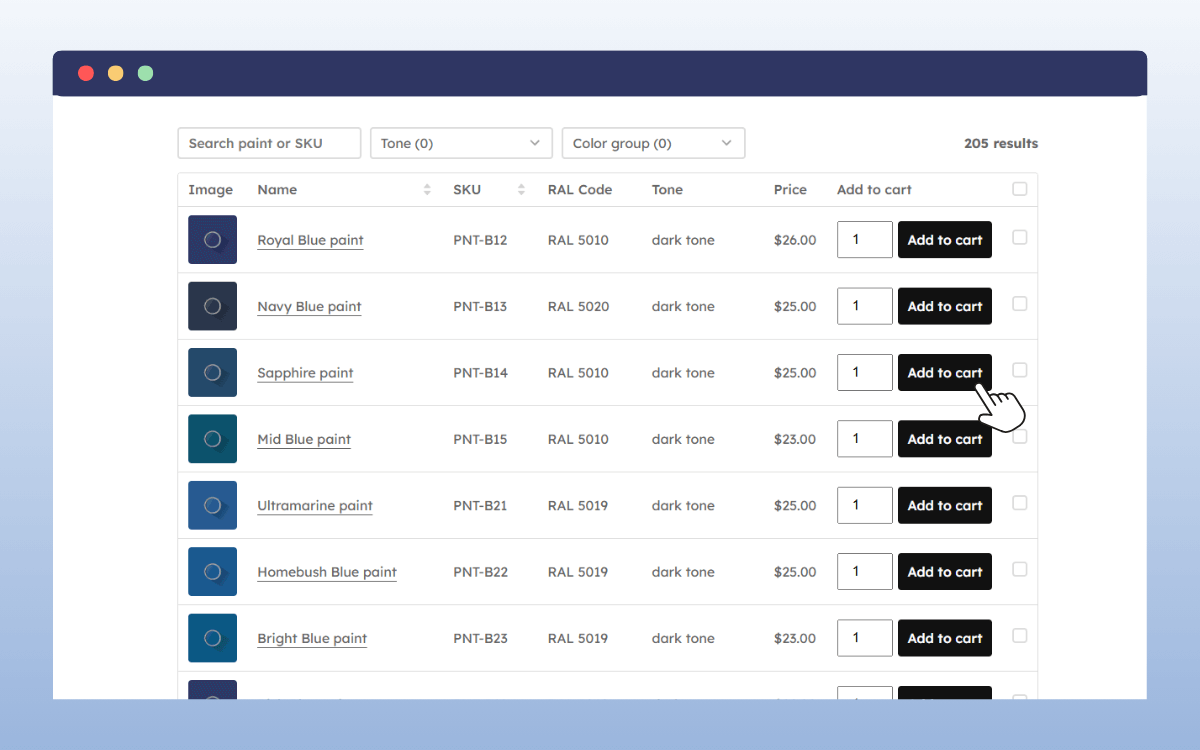
Most product table plugins pull data directly from WooCommerce, they work with existing product categories, product IDs, and archive pages. This means you are not creating separate products or managing content in two places.
WooCommerce Product Tables works alongside tools like Elementor for layout control and WPML for multilingual stores, which is important for B2B businesses operating across regions.
This approach keeps your existing product pages intact while giving trade customers a faster way to place orders.
How does WooCommerce Product Tables support wholesale and bulk ordering?
WooCommerce Product Tables is designed to make bulk ordering practical. It focuses on removing friction from the ordering process, especially for customers who already know what they need and just want to place an order quickly.
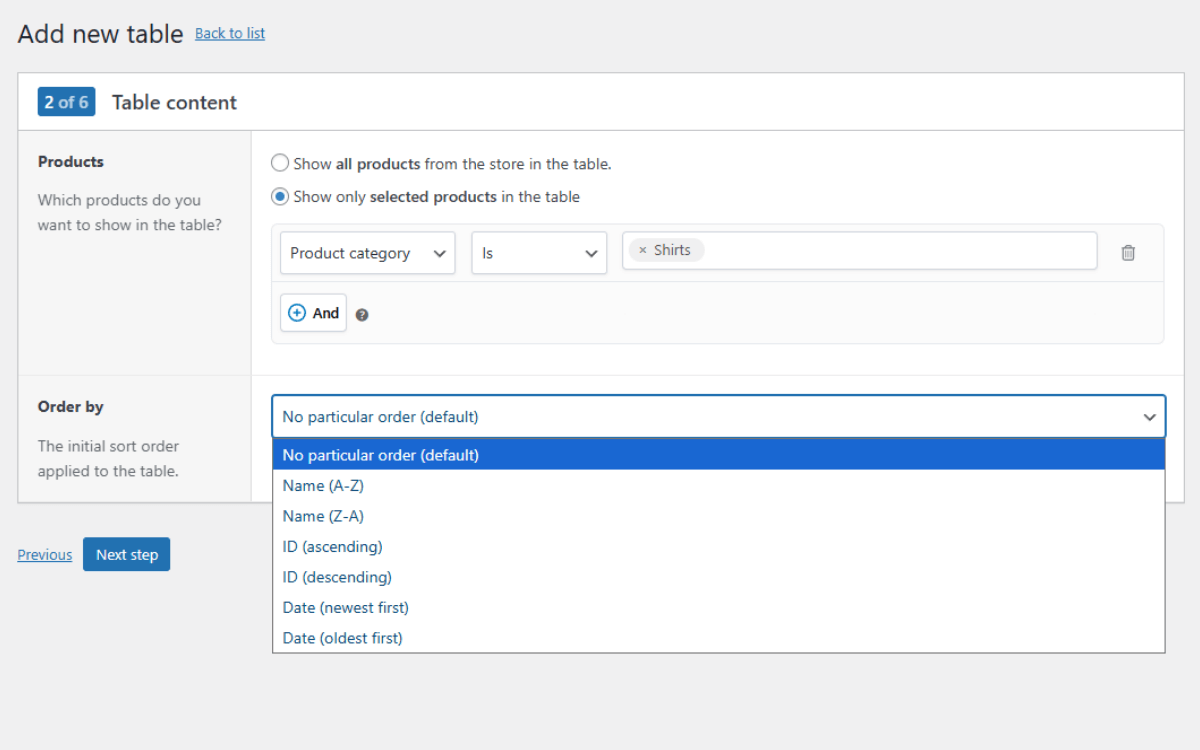
Show the products that matter
One of the main advantages is control. You can decide exactly which products appear in a table, whether that’s a single category, a specific group of items, or a trade-only range.
This makes it easier to create pages like a wholesale catalogue or bulk order list without duplicating products or changing how your store works behind the scenes.
Handle variations without breaking the flow
Bulk and wholesale orders often involve products with variations, such as size, colour, or format. WooCommerce Product Tables allow customers to choose these options directly from the table.
Variations can be shown using dropdowns or displayed as separate rows, as a button that takes customers to the product page, and more. Either way, customers don’t need to leave the page to complete their selection.
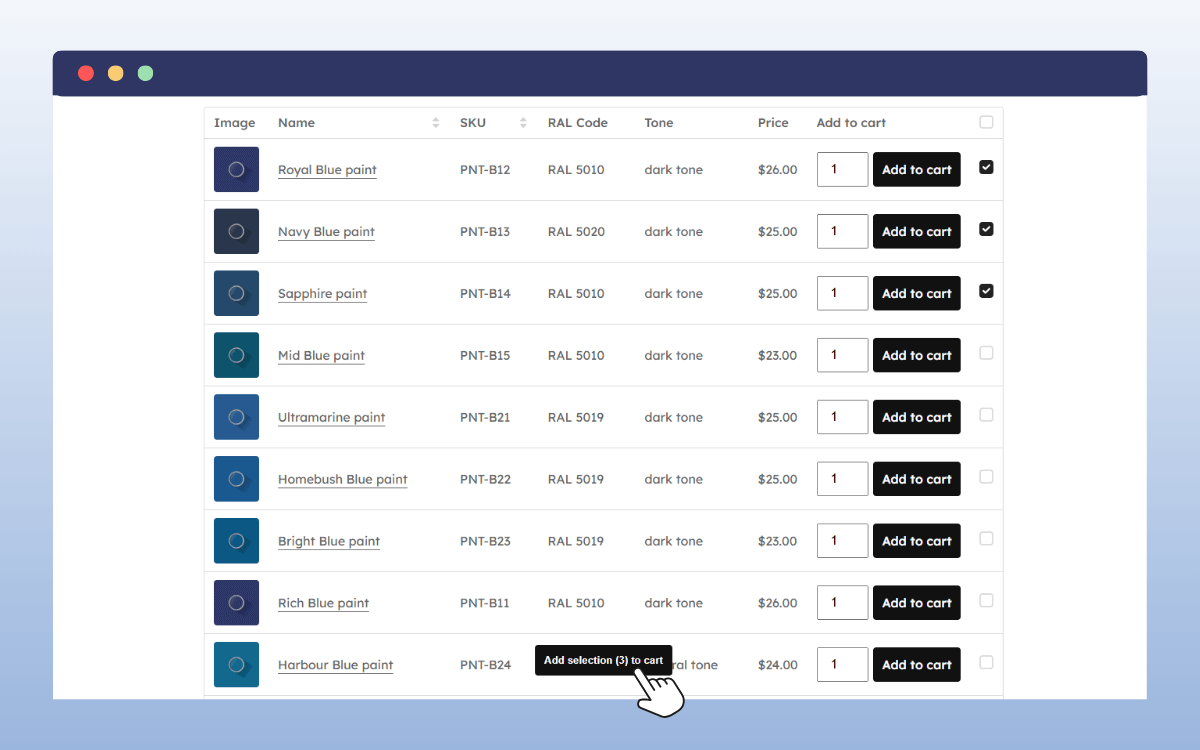
Add multiple products to the cart in one go
A common frustration for wholesale buyers is having to add items to the cart one at a time. WooCommerce Product Tables removes this issue.
Customers can enter quantities for several products and add them all to the cart at once. Because this uses AJAX, the page doesn’t reload, which keeps things quick and reduces interruptions during ordering.
Place tables where customers expect them
Product tables can be added to pages, posts, or dedicated ordering areas using a shortcode with WooCommerce Product Tables. This means you can create a clear separation between retail browsing pages and fast-order pages for trade customers, without complex workarounds.
Performance, filtering, and frontend experience
Wholesale catalogues can grow quickly, which makes performance an important consideration. WooCommerce Product Tables includes features designed to optimise large tables without overwhelming the frontend.
These include:
- AJAX-powered add to cart actions to avoid page reloads.
- Pagination to limit how many products appear at once.
- Options to filter products by category, attribute, or custom taxonomy.
- Sortable table columns so buyers can reorder results by price or product name.
From a store owner’s perspective, everything still lives in the WooCommerce backend. Product tables simply change how information is presented on the frontend, without altering how products are stored or managed.
Basic styling options are included, and more advanced adjustments can be handled with CSS if needed, without touching core PHP or HTML files.
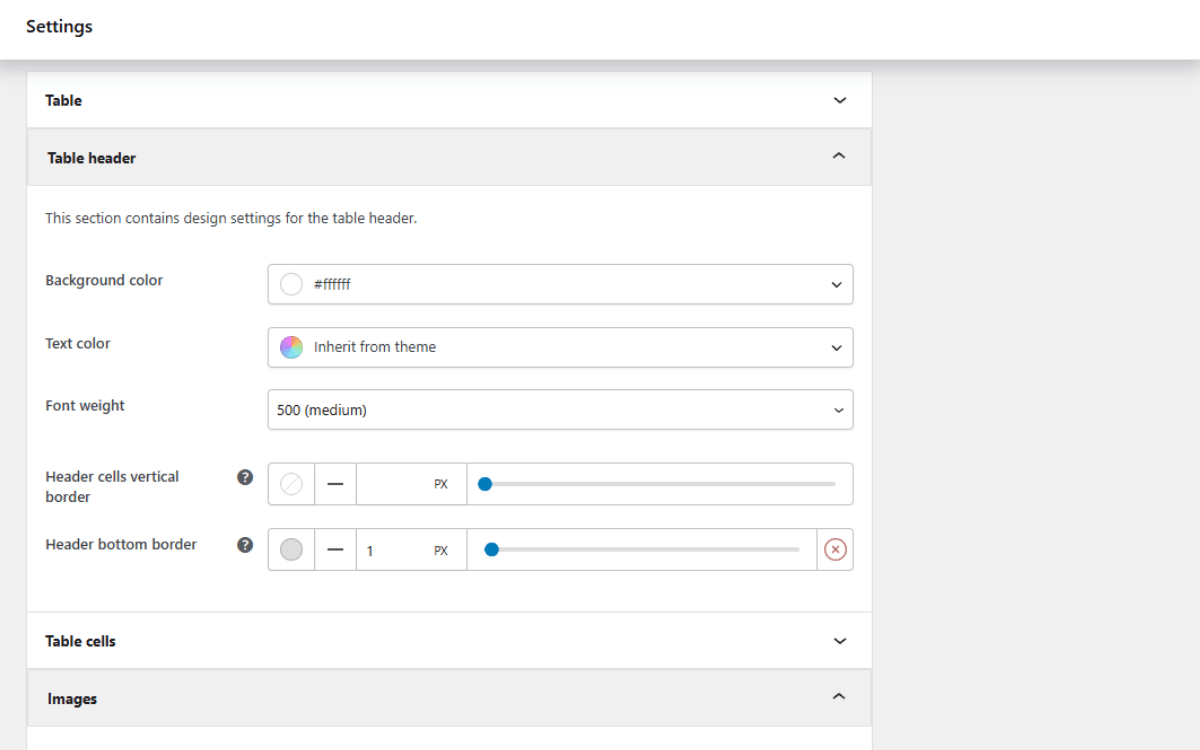
Adjust the look without custom code
The table layout and columns can be tailored to suit your store. You can choose what information appears, how it’s ordered, and how it fits within your existing theme.
This keeps the experience consistent with the rest of your site, while still optimising the layout for speed.
FAQs about using product tables
Are product tables suitable for all e-commerce stores?
Not always. Product tables work best for stores that sell to wholesale, B2B, or repeat buyers who already know what they want. For retail stores focused on discovery or storytelling, standard product pages are still important. Many stores use both, depending on the customer and the order type.
Can product tables handle variable products?
Yes. Most product table solutions support variable products, allowing customers to select options such as size or colour directly from the table. This keeps the ordering process on one page and reduces errors during bulk orders.
Do product tables affect performance?
When set up properly, product tables are designed to perform well, even with larger catalogues. Features like pagination, lazy loading, and optimised queries help prevent slow load times. Performance issues usually come from trying to display too many products at once without limits.
Are product tables better than standard product pages for wholesale?
For wholesale and bulk ordering, yes. Product tables are faster, reduce clicks, and make it easier to add multiple products to the cart. Standard product pages still have a place, but product tables are better suited to high-volume and repeat orders.
Can I use product tables alongside standard shop and product pages?
Yes. Product tables work alongside your existing shop page, category pages, and single product layouts. Many stores use product tables specifically for wholesale or bulk customers, while keeping standard product pages for retail buyers.
This lets you optimise the ordering experience without changing how your entire store works.
Using product tables to simplify bulk ordering
So there we have it. In this article, we’ve looked at how product tables support wholesale, B2B, and bulk ordering.
If you’re running a WordPress site, WooCommerce Product Tables is a solid option for adding this type of ordering experience. It extends WooCommerce with a table-based layout designed specifically for bulk and wholesale orders, without disrupting your existing store setup.
Used in the right context, product tables are a practical way to make bulk ordering easier for customers and more manageable for your business.
