
Are you looking for wholesale order form examples to inspire your own? You’ve come to the right place.
Figuring out how to structure your wholesale order form and what to include in it can be challenging. The good thing is that other e-commerce wholesalers have successfully done it before. It certainly helps to know how they’re doing it and see what works in practice.
So in this article, we’ve rounded up 5 wholesale order form examples from e-commerce sellers across different industries to help inspire your own. We’ll also show you how to create your wholesale order form in WooCommerce.
But first, let’s outline what wholesale order forms are, so we’re on the same page.
What are wholesale order forms?
A wholesale order form is a structured way for retailers and other B2B (business-to-business) customers to order products in bulk from a wholesaler. B2B customers specify the products they want, in the quantities they want, in this form.
Wholesalers will review the form to get the order details and then fulfill the order. Unlike regular retail checkout flows, which are designed for customers buying one item at a time, wholesale order forms are optimized for speed.
They allow customers to purchase multiple products in large quantities at once. Depending on whether you use them offline or online, wholesale order forms can take two forms:
- Physical order forms (paper-based). These are more traditional, and the customer needs to fill them out manually, either on paper or in a PDF they print or scan.
- Online forms. These are more common because they automate the entire ordering process.
What is an online wholesale order form?
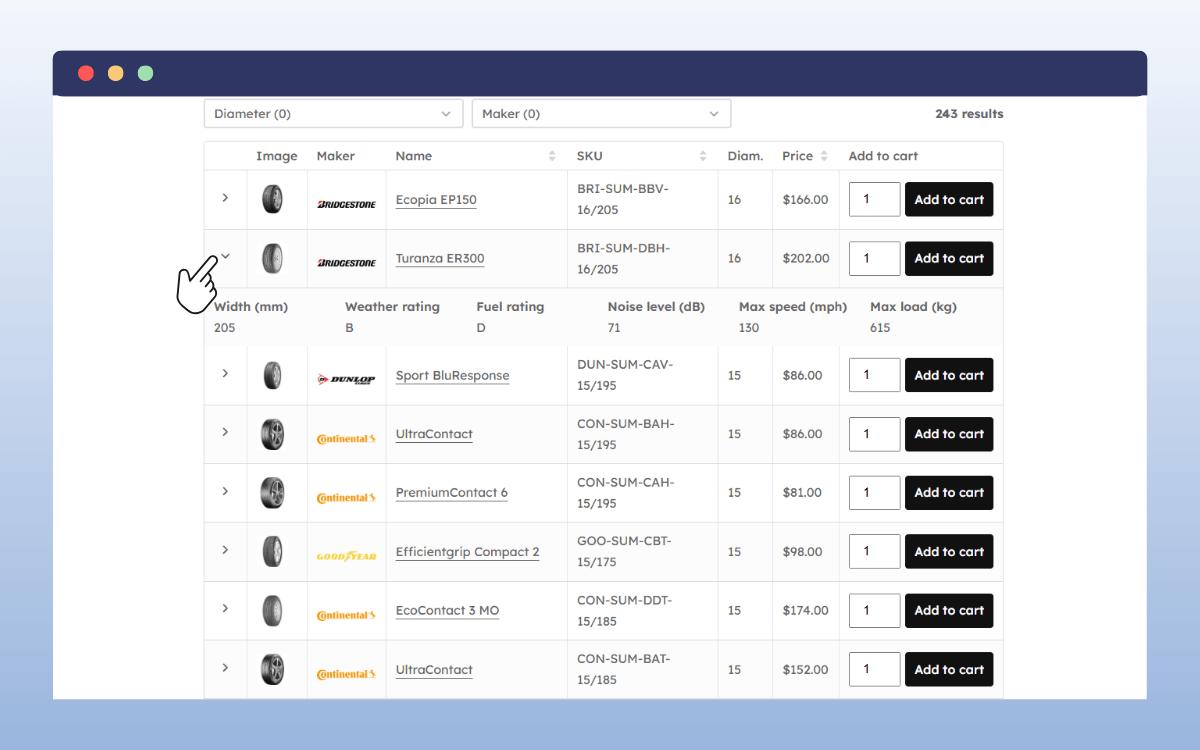
This is a page in your online store where wholesale customers can shop for products in bulk. It is much like a typical e-commerce shop page, except it displays products differently. Usually, in a table or list.
This table/list will only have important information, like:
- The product name
- Its image(s)
- A quantity field
- An Add to Cart button
With this layout, wholesale buyers can view numerous products and buy them all at once. Since they don’t have to switch between individual product pages, this setup makes bulk buying easier.
So that’s what wholesale order forms are. Now, let’s look at 5 wholesale order form examples you can use as inspiration when you create your own.
5 online wholesale order form examples
If you haven’t built a wholesale order form before, you might need some inspiration to get it done. While order form templates are an option, examples from real-world wholesalers are the best place to look because they show what actually works.
You’ll be able to see how other e-commerce wholesalers:
- Display wholesale prices, product variants, and bulk order options.
- Organize product data.
- Make the order form blend with the rest of their online store, etc.
Different industries have different ordering habits. By looking at the examples in your industry, you’ll see how other sellers handle the needs specific to what you sell.
McMaster-Carr
McMaster-Carr supplies a huge variety of industrial products. It has a large catalog of tools, hardware, fasteners, and raw materials. It sells these products to both industrial clients (like maintenance companies) and individuals who need parts.
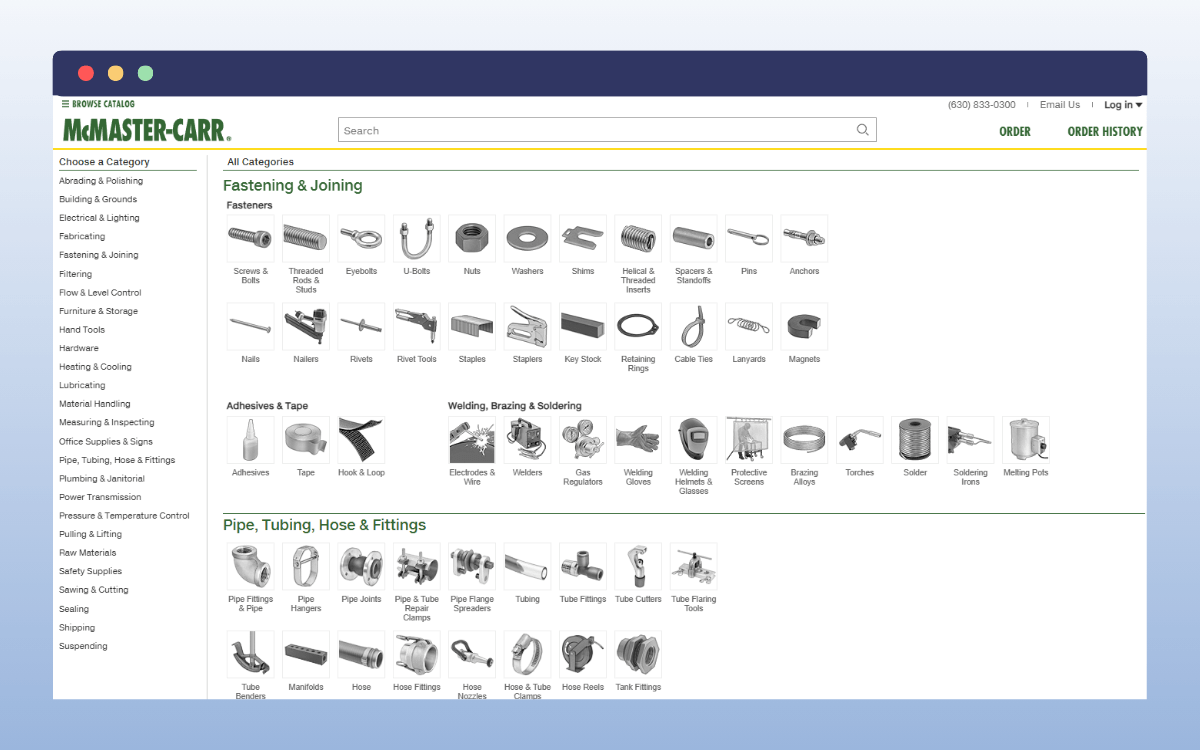
Because McMaster-Carr has such a large catalog, its wholesale order form serves two main purposes:
- To present the information that customers need to make a buying decision. Industrial products have many specifications, material details, and maintenance details. McMaster-Carr provides all this information in its order form.
- To help buyers find what they need and buy it quickly.
McMaster combines the catalog and the wholesale order form into a single system.
How McMaster-Carr structures its wholesale order form
McMaster-Carr has a massive catalog, so how do they handle this? They have broken it down into several categories, which you’ll see as soon as you click on the homepage. These categories subdivide further into smaller sub-categories and product types.
When a customer visits the online store, they’ll first click on a main category. This category reveals other subcategories (which may have subcategories of their own). Customers will be able to click to move down the subcategory tree until they reach a single product.
Here’s where they’ll see an order form showing the different variants of that product.
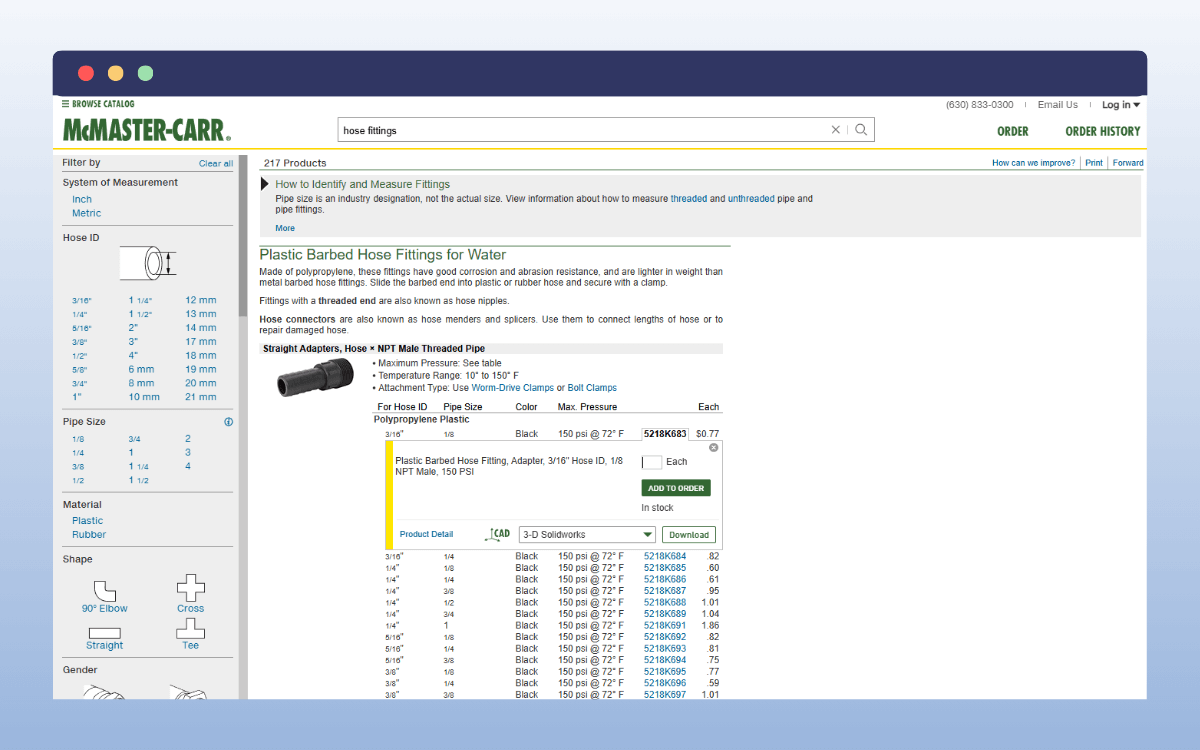
What features can you see in McMaster-Carr’s bulk order form?
Each order form has the following features:
- Detailed product listings: You’ll see a few columns for the main product features only. Then, there is a link that takes you to more details for that specific product, including the measurements, materials, colors, etc. Instead of product images, McMaster-Carr includes downloadable 3D files to give customers a better view of what the products look like.
- Powerful filters: You’ll start with broad filters that become more specific as you go down the subcategory tree.
- No minimum orders: Because McMaster-Carr sells to individuals as well as companies, it doesn’t impose minimum order quantities.
- Collapsible Add to Order button and quantity field: Once customers are ready to order, they can expand this field and place an order.
What makes it a great example of a wholesale order form?
It’s a classic example of what to do when you have a large catalog: break it down into categories and sub-categories. McMaster-Carr goes further by giving its catalog a hierarchical structure to make navigating through it easier.
On top of this, their search and filter options help customers find what they’re looking for, regardless of how large the catalog is. Finally, it maximizes the order form’s columns by hiding the Add to Order button, stock details, and quantity fields by default.
Grainger
Grainger is one of the leading suppliers of maintenance, repair, and operations (MRO) products in the U.S. As a business, Grainger mainly sells to industrial companies, institutions, and sometimes individuals (although they aren’t the primary customer).
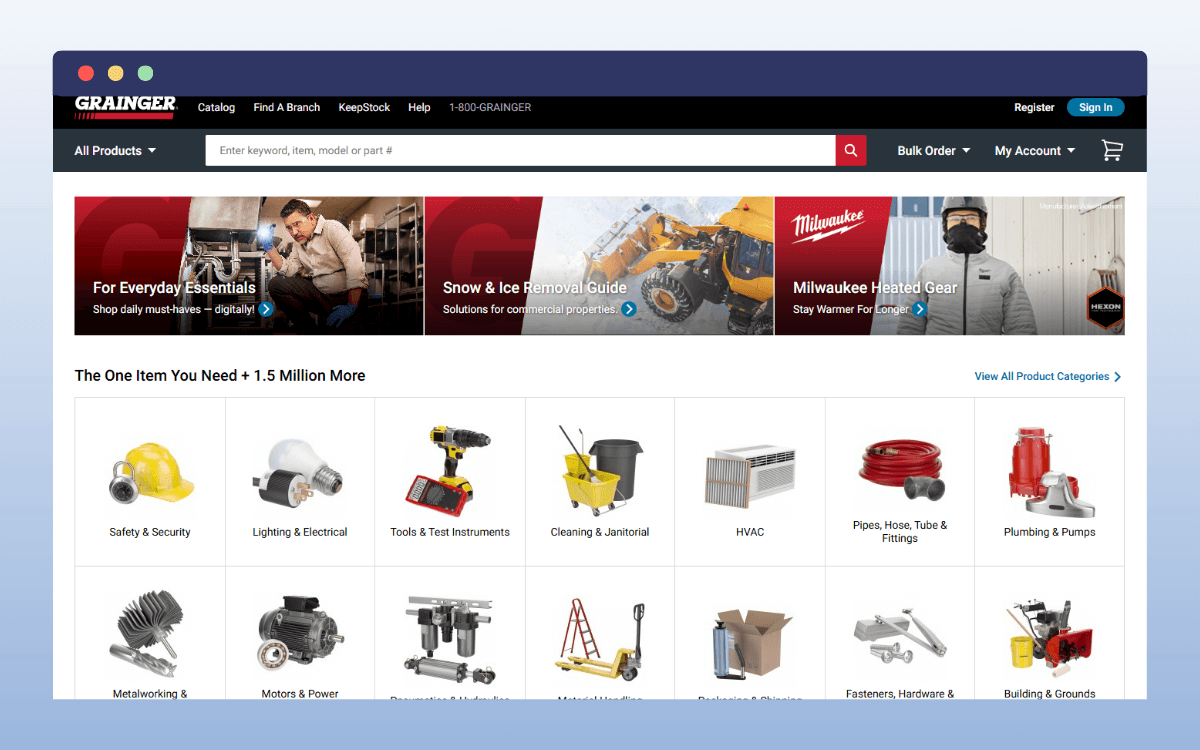
Grainger sets up its order forms to:
- Enable repeat buyers to make purchases quickly. They already know what they want and just want to get it quickly.
- Help newer customers (or those yet to decide) have all the information they need to make a buying decision.
How is Grainger’s order form structured?
Grainger has two form modes that customers use to order products from the supplier:
- A quick order entry pad: You’ll find this pad in the navigation bar next to My Account under the title Bulk Order. Hovering over it expands to reveal fields for SKU and quantity, plus an Add to Cart button at the bottom. This is ideal for repeat buyers who already know the SKUs of items they want to buy. They can enter the SKUs and quantities, and then click Add to Cart to complete their orders.
- A complete order form table for each product type: Customers access this by navigating a sub-category tree to reach a specific product type.
Like McMaster-Carr, the complete order form has search and filters to help customers get around. But its filters are much more visual, with some filters containing images. Where there are too many filters, there is a search functionality to help you find filters.
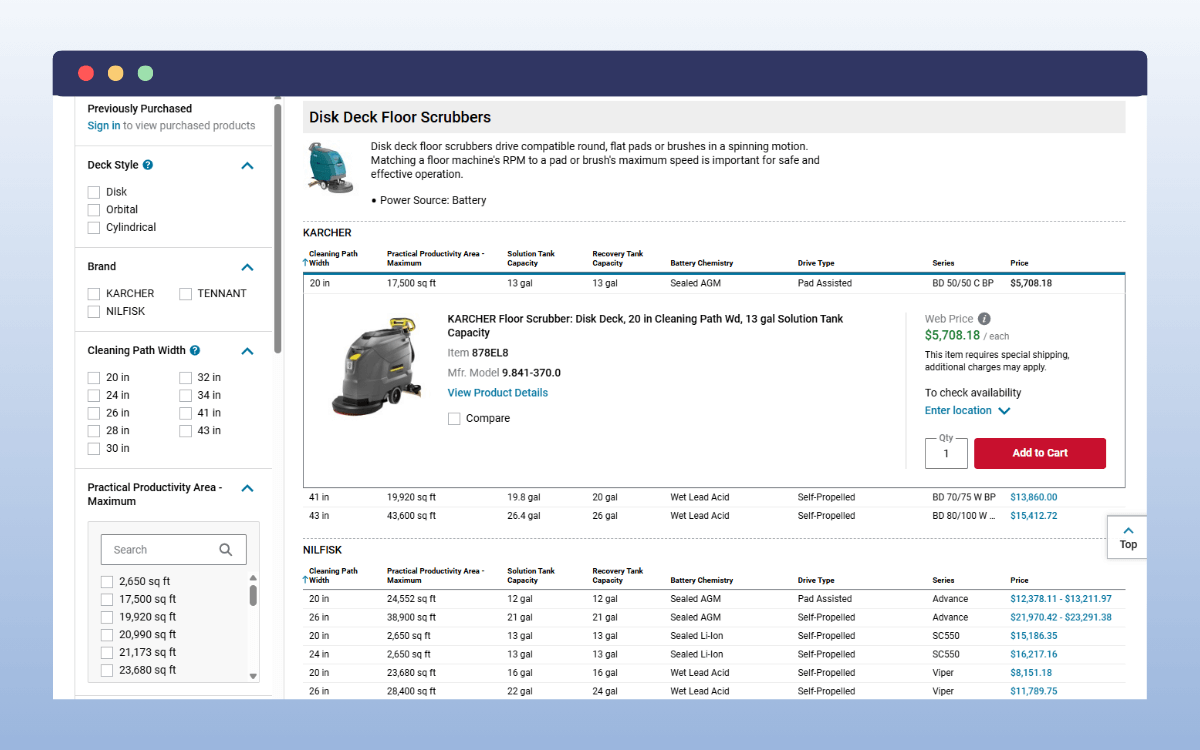
Clicking on a row in the order form table expands it to reveal:
- A comparison checkbox, which allows you to compare up to 5 products.
- Quantity fields and a location dropdown, where you can fill in these details.
To avoid cramming the table, Grainger links product variations to a new page for those who want to see the details.
Why it’s useful
Grainger’s order forms serve repeat customers who want to buy quickly and those who want to do a bit of research before making a buying decision.
Uline
Uline mainly deals in products like shipping and packaging materials (e.g. boxes). But it also sells industrial and janitorial supplies. These products are typically used up quickly and constantly reordered.
As a result, Uline customers (small businesses or warehouse supervisors) prioritize the speed of ordering. This means fewer clicks and less scrolling. Customers simply want to get in, place an order, and leave as fast as they can. So, Uline has set up its order forms to support this.
How Uline sets up its order forms
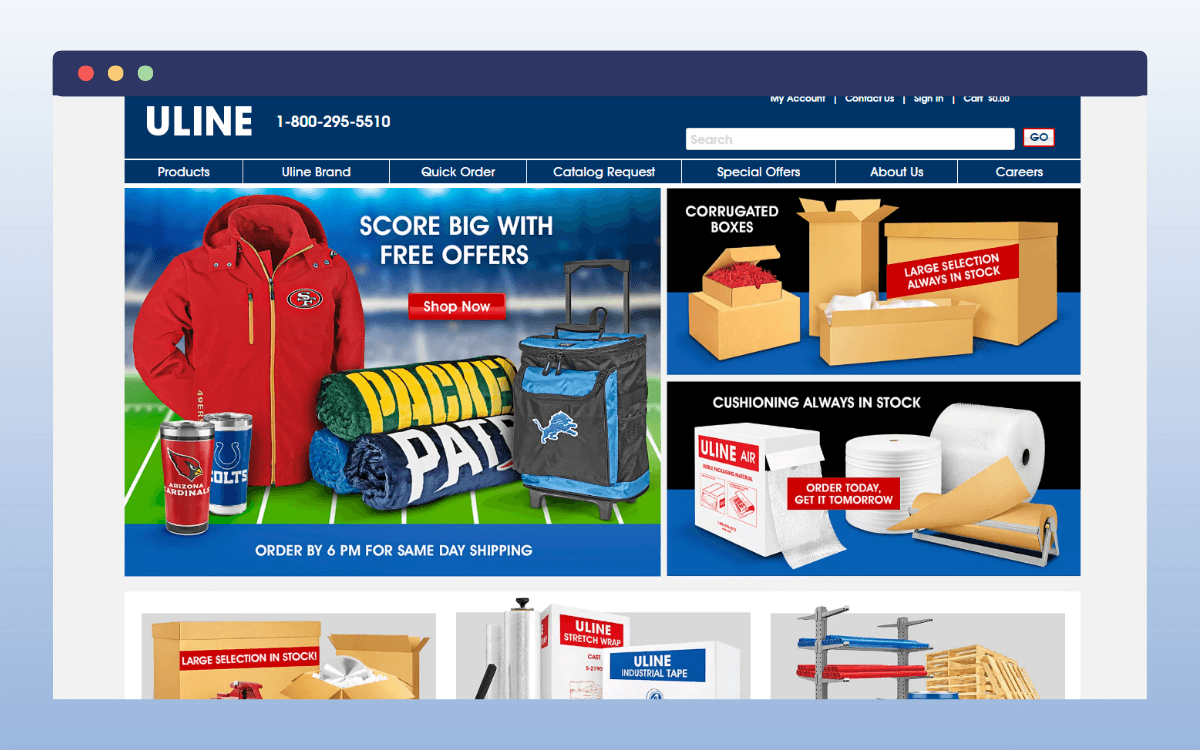
First, Uline has a quick order form in the global header. If you click there, it opens up a form where you can order new items by filling in their model numbers and quantities (qty). This is the ideal option for those re-ordering consumables like boxes.
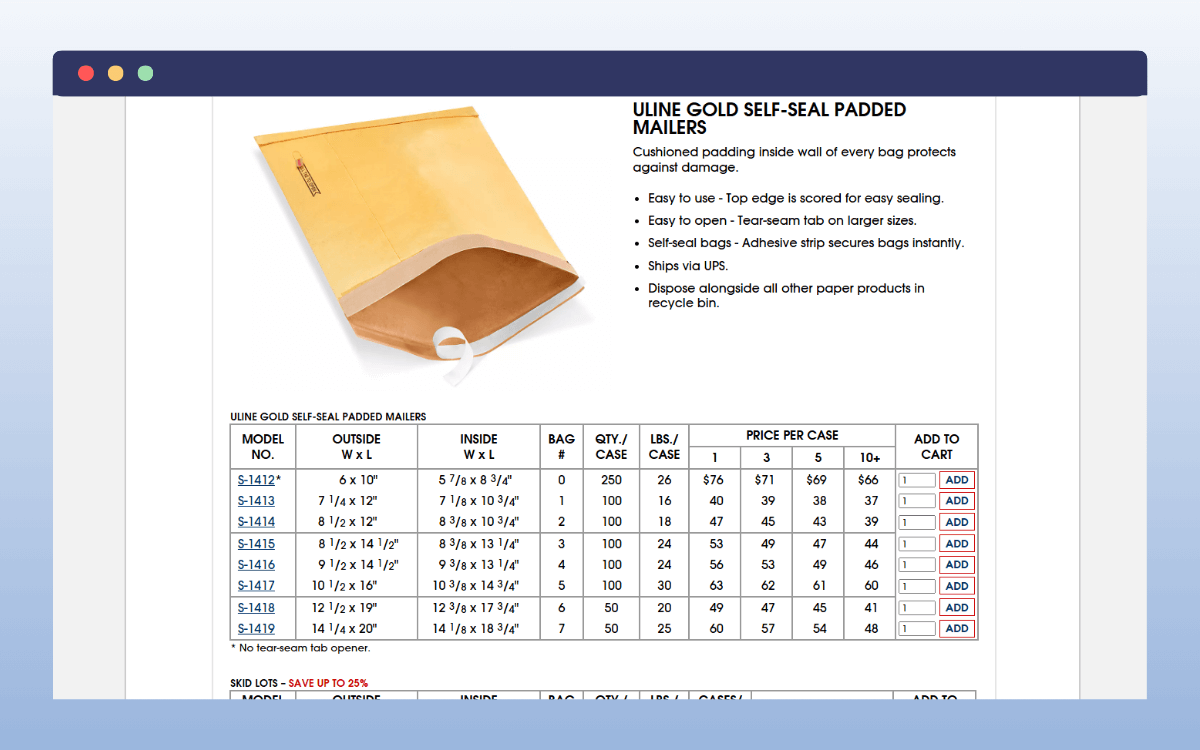
Secondly, it has a simple, spreadsheet-style order form that suits its customers in the following ways:
- Fewer columns: Uline sells simple products that don’t need too much specification. For boxes, for example, you only need the dimensions and price per box columns.
- Visible quantity files and the Add to Cart button: Fewer columns means that there’s room to have these two sections visible from the outset. There’s no need for customers to click to reveal them.
Because customers don’t have to go through extra clicks, they can shop faster.
Although Uline’s forms have a search functionality, they exclude filters. Seeing as the forms only have a handful of products, you can see why.
Why is this a good example?
Uline’s order forms fit the purpose for which they’re created. Customers see only essential information, nothing more. If you sell similar products, you should create a simple form that allows customers to order quickly.
DigiKey
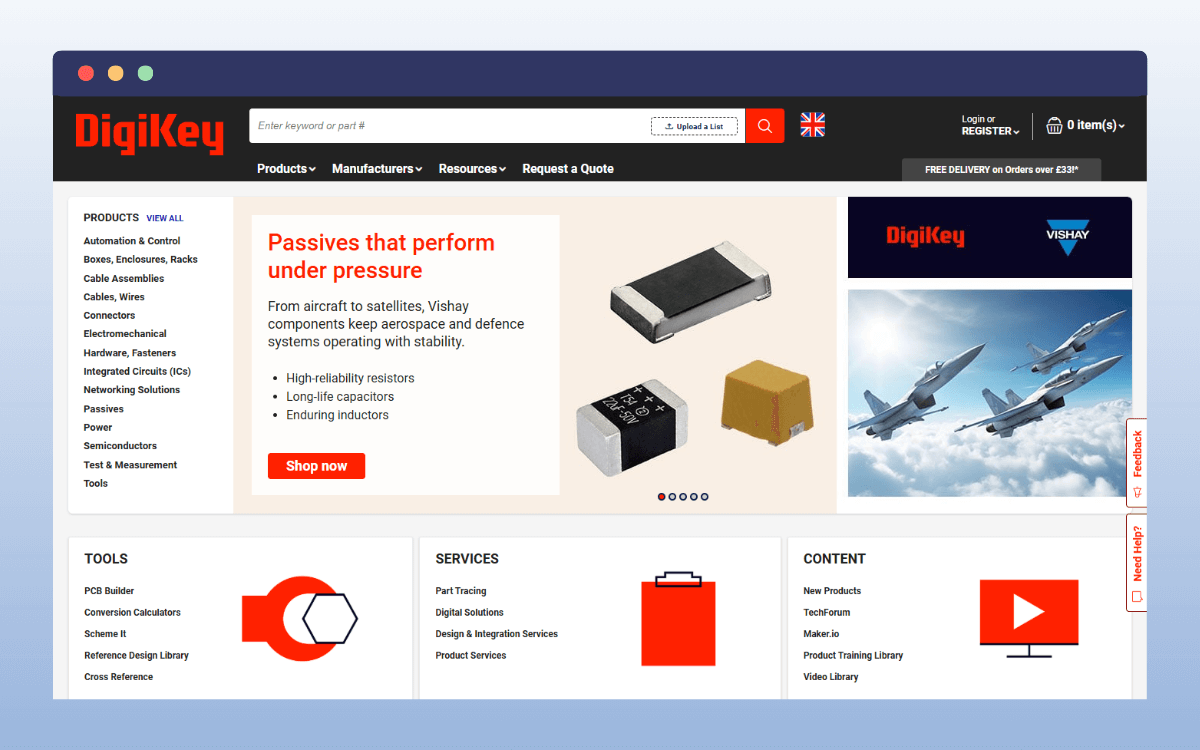
DigiKey distributes electronic parts, including capacitors, cables, and connectors, all over the world. It has a very large inventory, usually stocking more than 17 million items from over 3,000 manufacturers.
DigiKey has set up its order form to help potential customers find specific parts without being overwhelmed by the rest of the inventory. It allows them to filter through millions of products to find the specific product they’re looking for.
Otherwise, customers would easily get lost in all the options and end up abandoning their purchase.
How DigiKey’s order form is structured
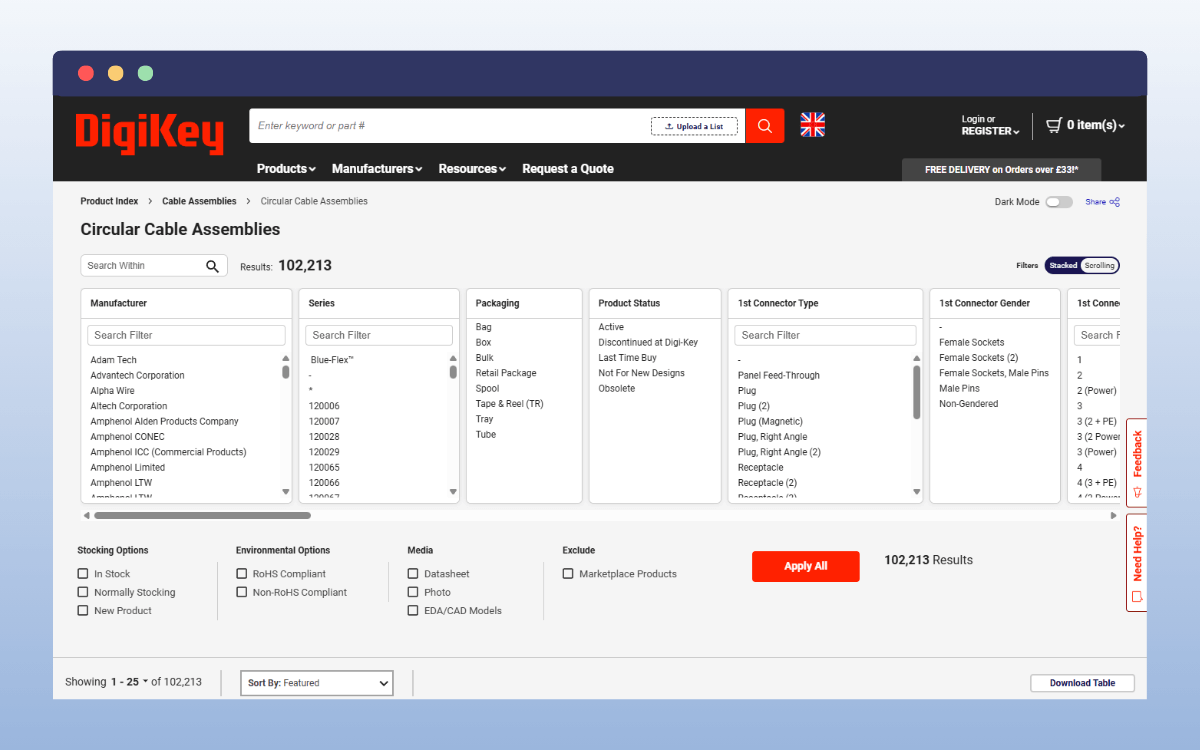
What stands out in DigiKey’s wholesale order forms is the number of filters available. Some product types have over a hundred filters. Because there are so many, DigiKey allows you to search for them.
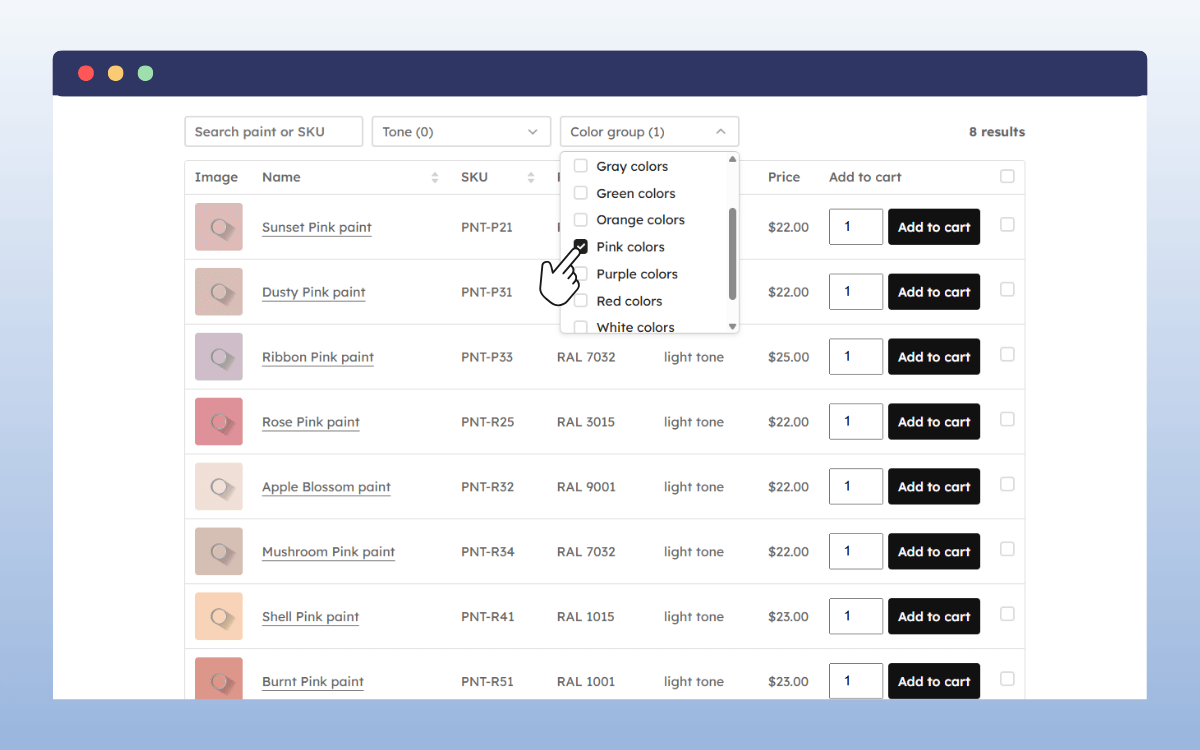
It presents these filters in columns above the actual order form, making it the most unique one we’ve reviewed so far. The order form’s content changes instantly as soon as you apply new filters.

Filters aside, it also has some good features worth mentioning, such as:
- Product image lightbox: When you hover over the product image thumbnail, an image lightbox pops up with the full image.
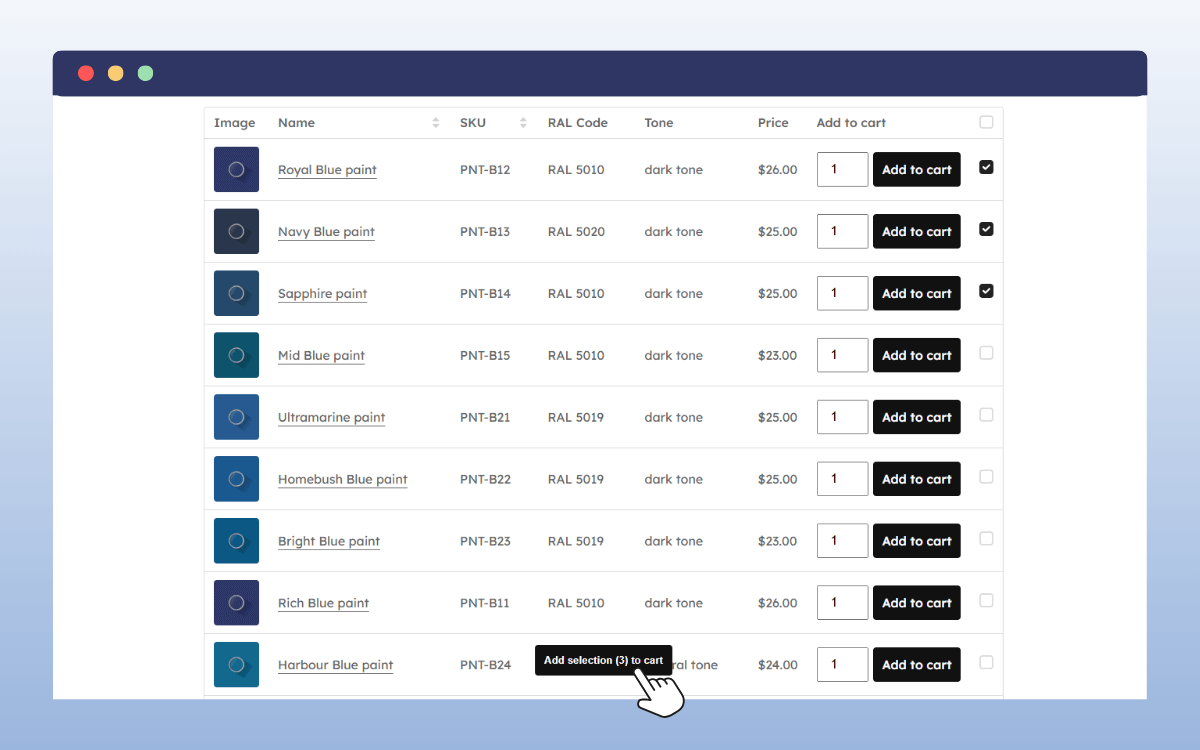
- Add selected options to your cart: Customers can check the box for multiple products and add them all to their cart at once.
You can also click on the product itself to view this or download a PDF file that DigiKey includes for each product.
What makes it a strong example
DigiKey uniquely handles its massive catalog using tons of filters. Just so filters don’t overwhelm potential customers, it allows them to search for specific filters.
Customers buying electronic parts will rarely buy just one item. To cater to these customers, DigiKey allows them to select multiple products and add them all to their carts at once. This shows how important it is to include bulk ordering options.
Medina Foodservice (Sysco company)
Medina Foodservice supplies a range of food items, including frozen food, fresh meat, and produce, in the UK. It operates as a wholesaler under the Sysco family – the world’s largest foodservice supplier.
Medina’s order form serves mainly to showcase its products and give customers information on what it sells. They serve both standard catering clients and institutions. As a result, the form supports bulk orders and easy re-ordering.
How is it structured?
Like most of the options we’ve covered, Medina Foodservice has a quick order form and a standard wholesale order form. In the quick order form, customers can search for one or more products using the SKU or product name and add products to their cart.
On the other hand, the standard order is a fairly simple product list. Like a restaurant’s menu. It has only two columns:
- One for the product details.
- The other for pricing.
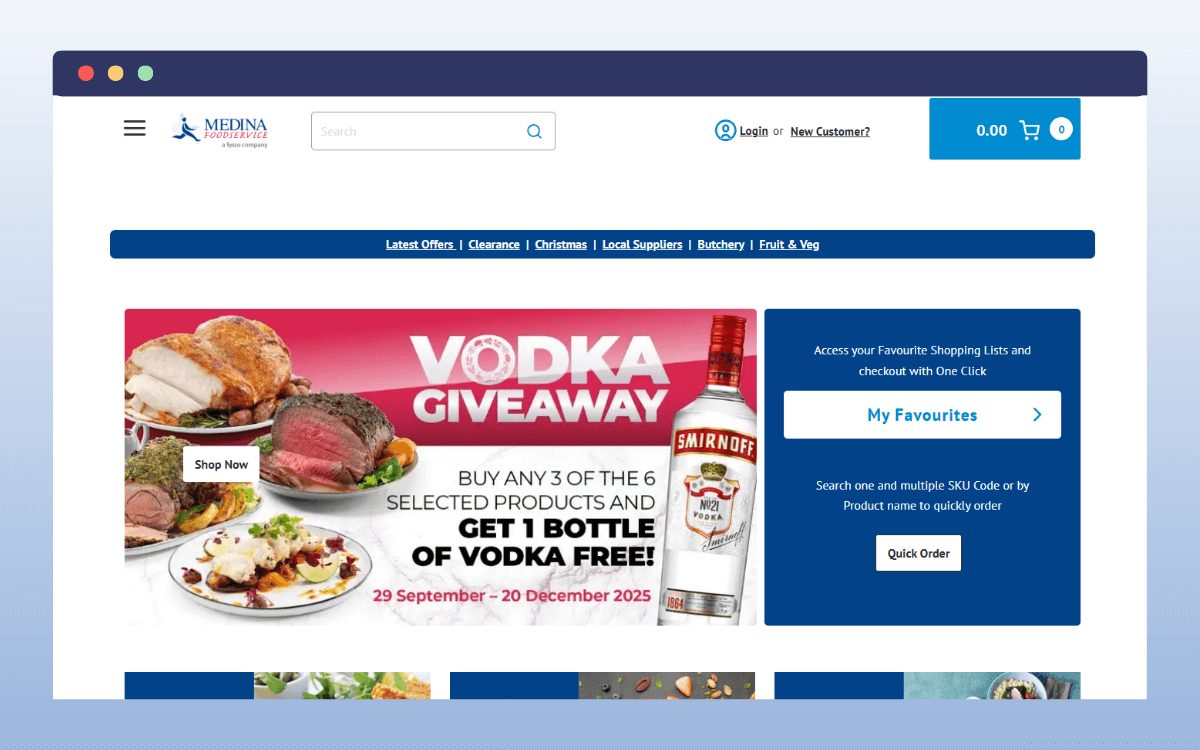
Prices are protected behind a login page; customers have to share their contact information before they can see this. Medina does this to offer negotiated pricing and prevent competitors from undercutting them.
Other than that, the form has a search option and filters to help customers find what they’re looking for.
Why Medina’s setup is useful
Medina Foodservice’s form shows how you can implement wholesale order forms as a foodservice provider. The order form doesn’t have to be complex with too many columns in this case. Instead, you can choose to include important information only and link the product details to a different page.
Also, if you’re in a competitive industry like food services, you can choose to only show prices to logged-in users in your order form.
Key takeaway: From these examples, you can see that wholesale order forms are useful across different industries. On top of that, there’s no one “right way” to create them. Ultimately, they should serve customers who want to order or re-order quickly, as well as those who want to explore first.
Next, let’s see how you can make a wholesale order form yourself.
How can I make my own wholesale order form?
Once you have your inspiration, creating a wholesale order form is next. To do this, you’ll need a website to host your order form, which you can create quickly with WordPress.
And when you have a wholesale website on WordPress, you can create these forms easily with the WooCommerce Product Tables plugin.
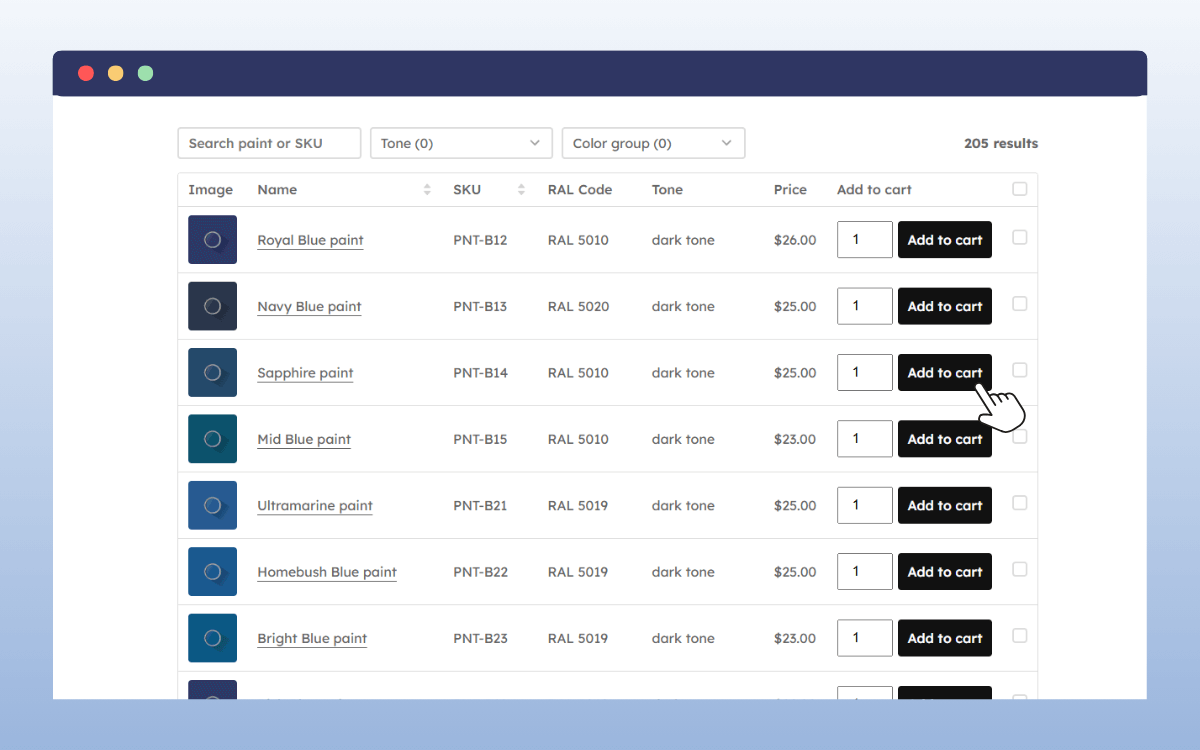
Create your own wholesale order form with WooCommerce Product Tables
WooCommerce Product Tables is built for creating fast, user-friendly product tables; perfect for wholesale order forms. You can create tables for any wholesale product you wish to sell.
From produce, consumables, electronic parts, and MRO products to industrial supplies. You can add as many products as you want and sell to anyone, not just other retailers. All without worrying about your order forms slowing down your site and frustrating your customers.
What makes WooCommerce Product Tables great for wholesale order forms?
With WooCommerce Product Tables, you’ll get:
- A customizable order form: It allows you to customize every aspect of your order form’s appearance. This includes the colors, fonts, columns, etc. This way, your order form blends with your online store.
- A full control form builder: You’ll have complete control over which columns to include or how variations and add-ons are displayed. You can also add more product information using dropdowns. Whether you want to stack the form with product data (like DigiKey) or limit it (like Medina Foodservice), it will all be down to you.
- A fast performance order form: If you have a large catalog like McMaster-Carr, you can add all your products to order forms. WooCommerce Product Tables is a lightweight plugin. It can support this without slowing down your online store.
- Powerful search queries and filters: That helps customers search through your catalog quickly and find their preferred product more easily.
- Tables for specific categories: When you have a large catalog, you might not want to lump all products in a single table (as we’ve seen in most of the examples above). With this plugin, you can create multiple tables and choose to display them by category. It makes browsing so much easier for your customers.
- Bulk ordering options: Let customers select multiple products by clicking a checkbox and add them all to their cart at once.
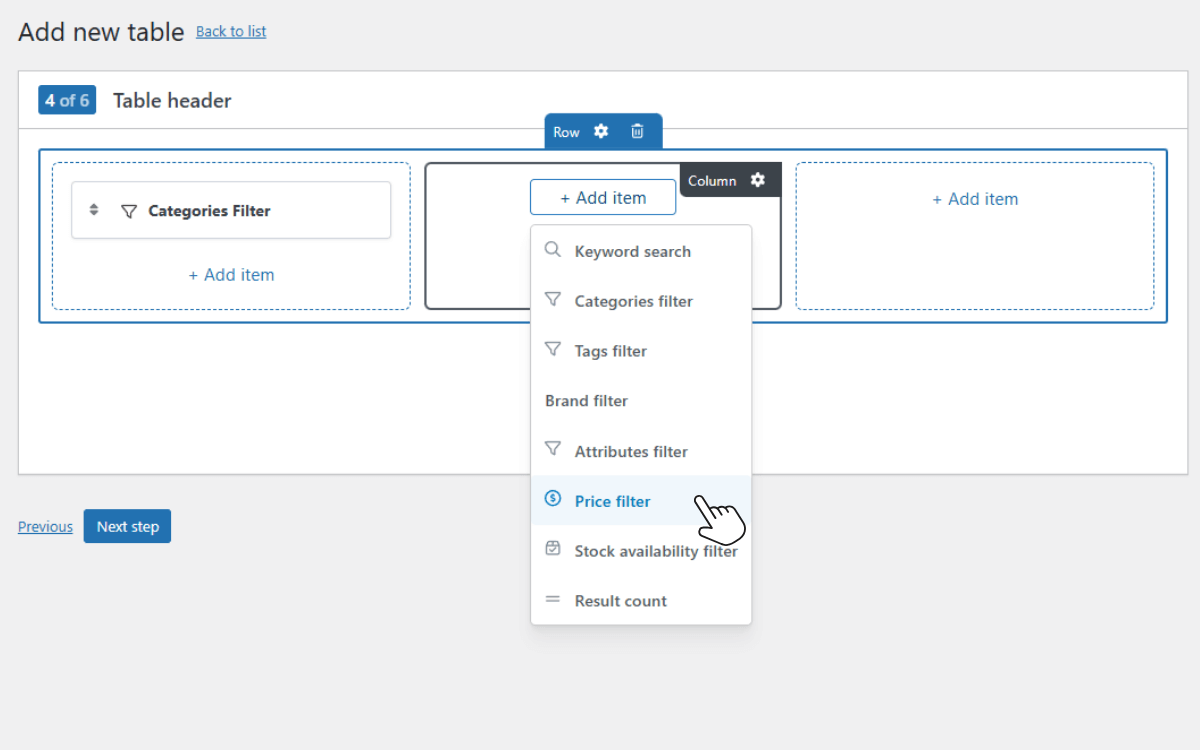
Use WooCommerce Product Tables to create your wholesale order forms
WooCommerce Product Tables enables you to run any wholesale business on your WordPress site. Whether you run a business requiring something simple, like a local foodservice supplier, or something more complex, such as an industrial parts supplier, you’ll find it helpful.
Get your wholesale order form set up today
Setting up a wholesale order form is easy when you have the right inspiration and tools. In this guide, we’ve walked you through several wholesale order form examples from different industries that you can use as inspiration.
From industrial parts sellers to foodservice wholesalers, getting inspiration from how they handle different parts of the wholesale order form will help you create your own.
And when you’re ready to get started, WooCommerce Product Tables is the plugin to help you get it done. It allows you to easily create fast, customizable order forms for your wholesale business. It’s flexible, user-friendly, and designed to work with any WooCommerce store.
