
Flash sales are short-term, high-impact promotional events lasting from a few hours to a few days, designed to create urgency and drive immediate sales. Using psychological triggers such as scarcity and exclusivity, flash sales captivate customers, prompting them to make quick purchasing decisions.
When done well, flash sales can become an important part of your sales strategy and e-commerce store as a whole:
- Clear excess inventory: Move slow-selling or seasonal products quickly to free up storage space and capital.
- Improve short-term revenue: Create urgent buying decisions that bring sales within hours or days.
- Increase customer loyalty: Reward existing customers with exclusive deals and attract new buyers with compelling offers.
- Improve product discovery: Flash sale browsers often discover and purchase additional products beyond sale items.
To help you easily run flash sales on your WooCommerce store, we’ll be using the WooCommerce Discounts plugin by Wombat Plugins. This powerful tool simplifies the process of creating and managing flash sales, allowing you to set up targeted discounts, schedule your sales, and more.
Can you create flash sales without plugins?
WooCommerce includes native sale pricing with manual scheduling for individual products. You can set this up without any additional tools in the Product data tab for individual products:
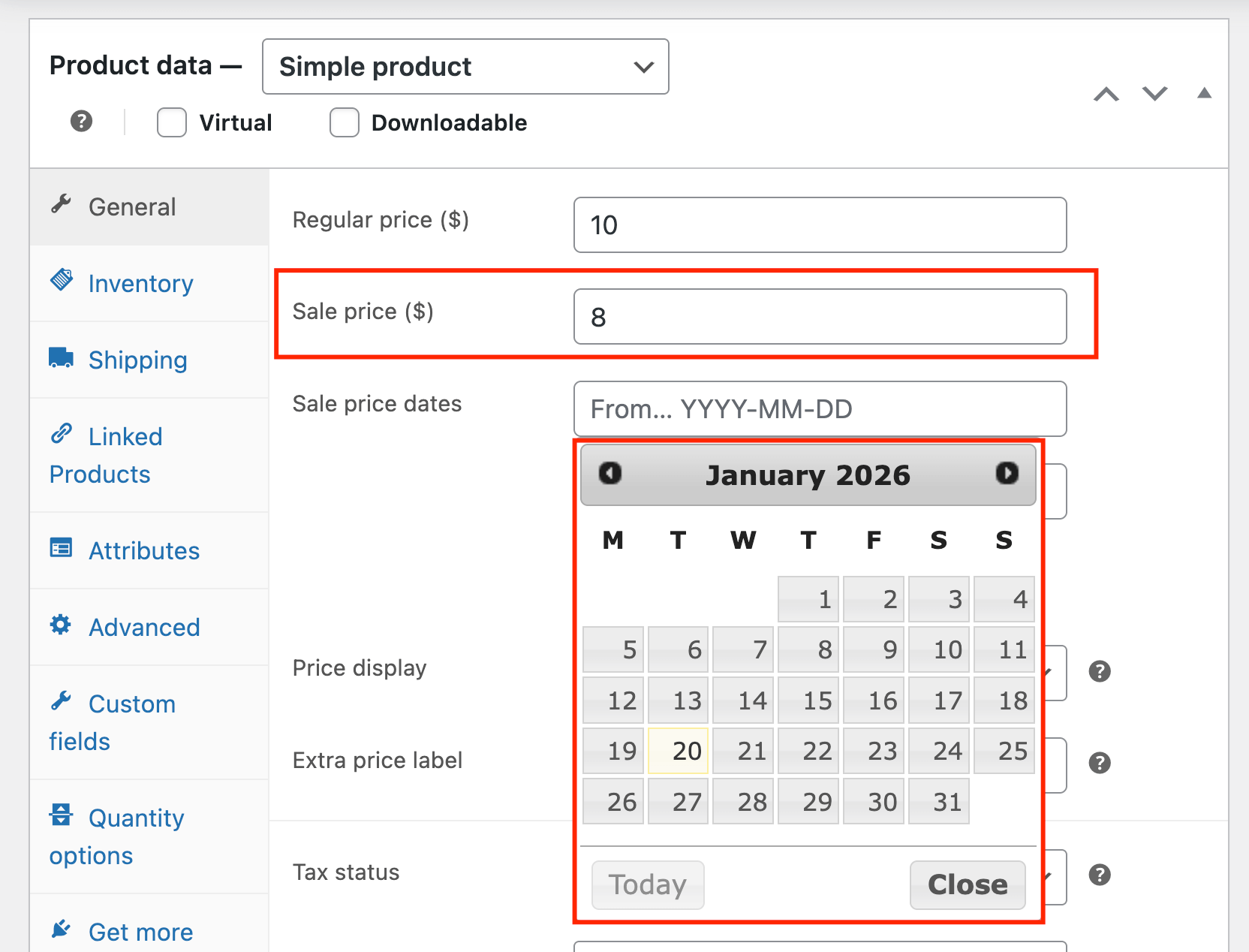
This approach works for occasional single-product promotions, but it falls short for true flash sales. Here’s what native WooCommerce can’t do:
- No bulk scheduling: You must edit each product individually because the bulk edit options don’t support scheduling. This is very impractical for storewide or category-wide sales.
- No countdown timers: Customers won’t see how much time remains, so it won’t really feel urgent as a normal flash sale should.
- No promotional banners: There’s no built-in way to announce your sale across your store.
- No user-role targeting: You can’t offer exclusive flash deals to VIP members or wholesale customers.
- No cart threshold conditions: Rules like “15% off orders over $100” aren’t possible.
For flash sales that need urgency elements, bulk application, or conditional rules, a dedicated plugin removes these limitations and saves significant setup time.
Best WooCommerce flash sale plugins
Several sales plugins can help you run effective flash promotions. Here are the most popular options:
- WooCommerce Discounts by Studio Wombat provides comprehensive flash sale automation with scheduling, conditional rules, and promotional messaging. It’s designed for performance during high-traffic promotional periods.
- Discount Rules for WooCommerce by Flycart offers extensive discount rules with scheduling capabilities. The free version includes basic automated discounts, while the premium version adds purchase history conditions and complex rule logic.
- Extendons Flash Sale for WooCommerce focuses specifically on flash sales with built-in countdown timers and stock alerts.
- Dynamic Pricing With Discount Rules for WooCommerce handles different types of discounts and allows users to set up multiple start and end dates for their discounts.
This guide uses WooCommerce Discounts by Studio Wombat for its balance of features, performance, and ease of use.
Setting up your flash sale: A step-by-step guide
Setting up a flash sale in your WooCommerce store is simple and effective. Follow these steps using the WooCommerce Discounts plugin:
- Download, upload, and install the plugin on your WordPress site.
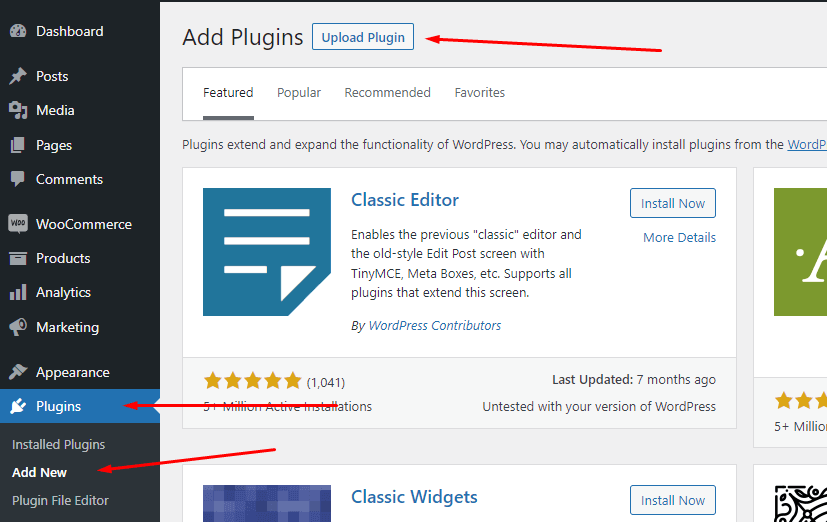
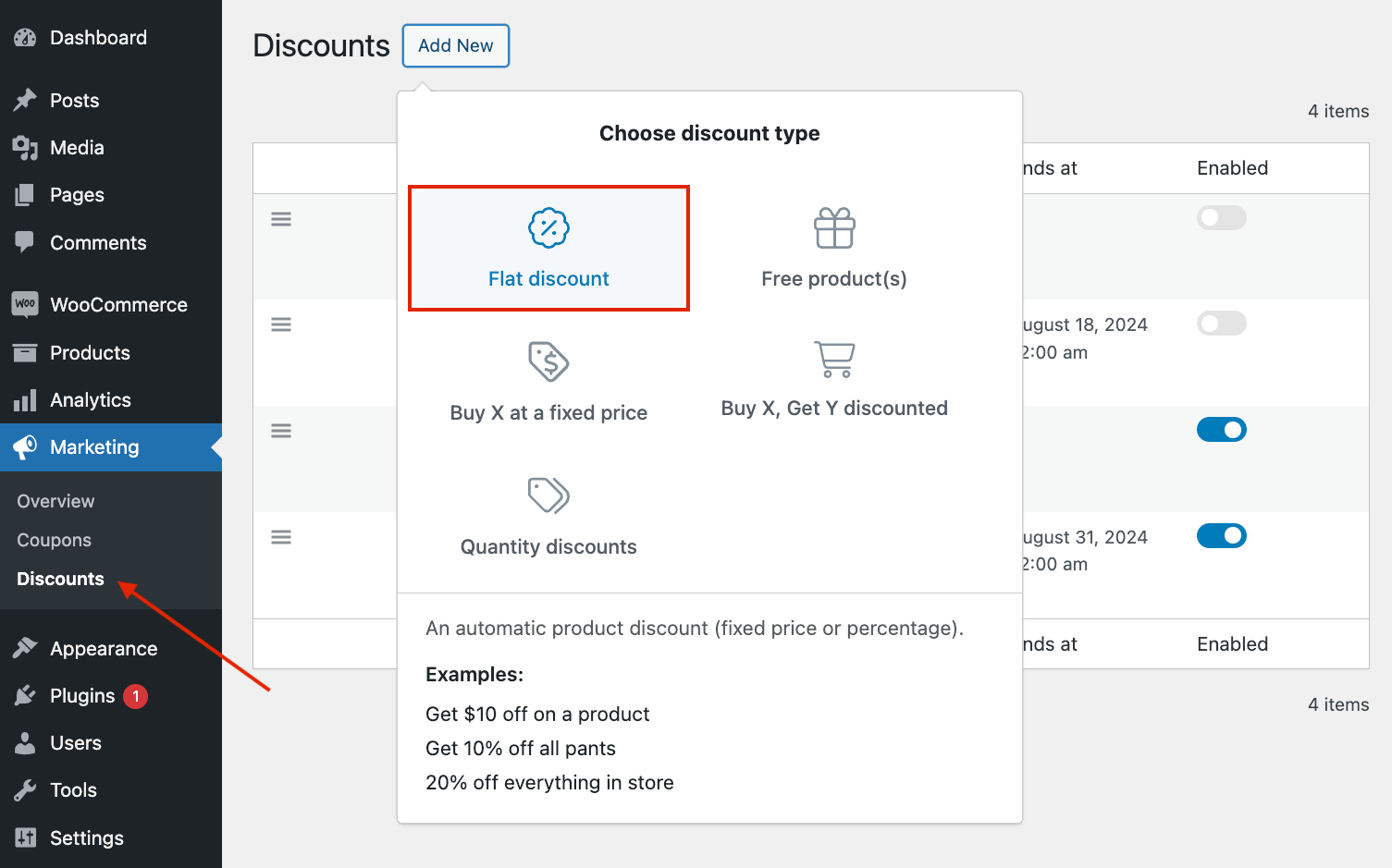
- Then, go to Marketing → Discounts and choose the type of discount you want to create. Let’s go with a simple flat percentage discount.
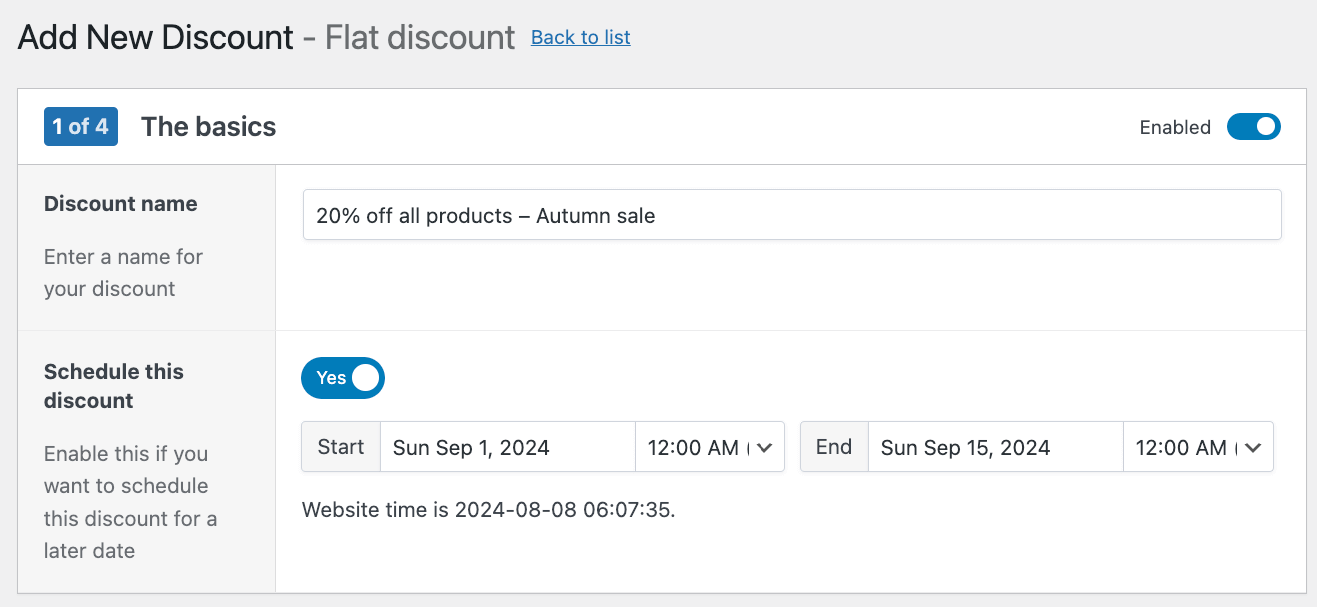
- Add a name to your discount and schedule it.
- Decide whether you want to apply this discount to all products or a specific set of items. This is also where you choose the discount amount.
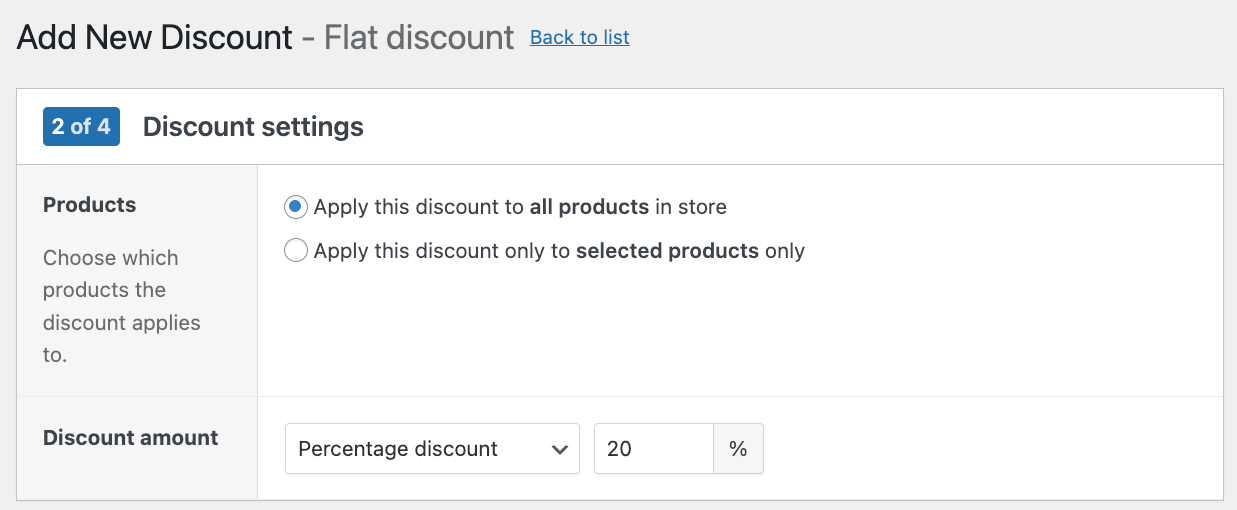
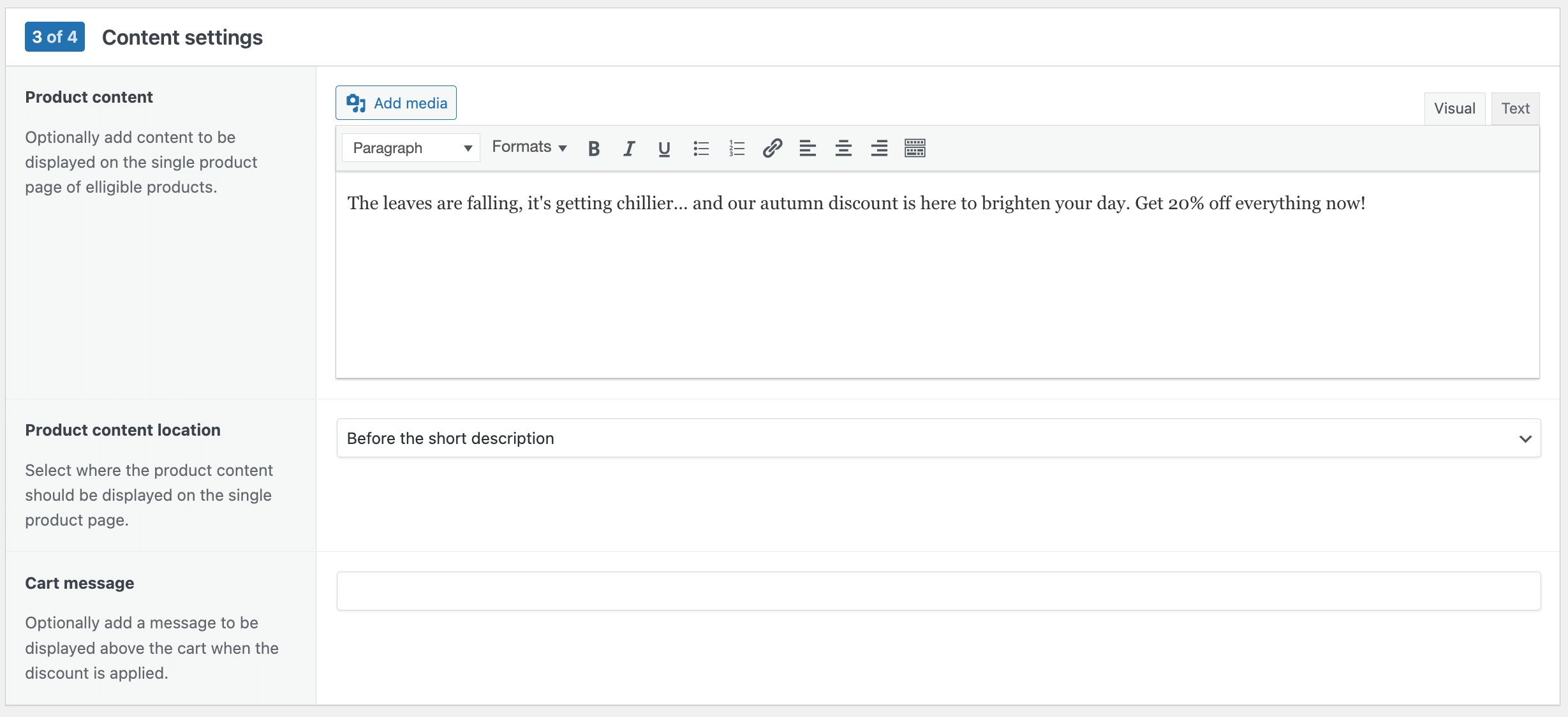
- Next, add a special message that will appear on product pages and the customer cart. This is a great opportunity to explain the discount rules and entice people to take advantage of it.
- Finally, add some extra conditions if needed, like a cart minimum, or make the sale exclusive to a specific user role (e.g. wholesale customers).
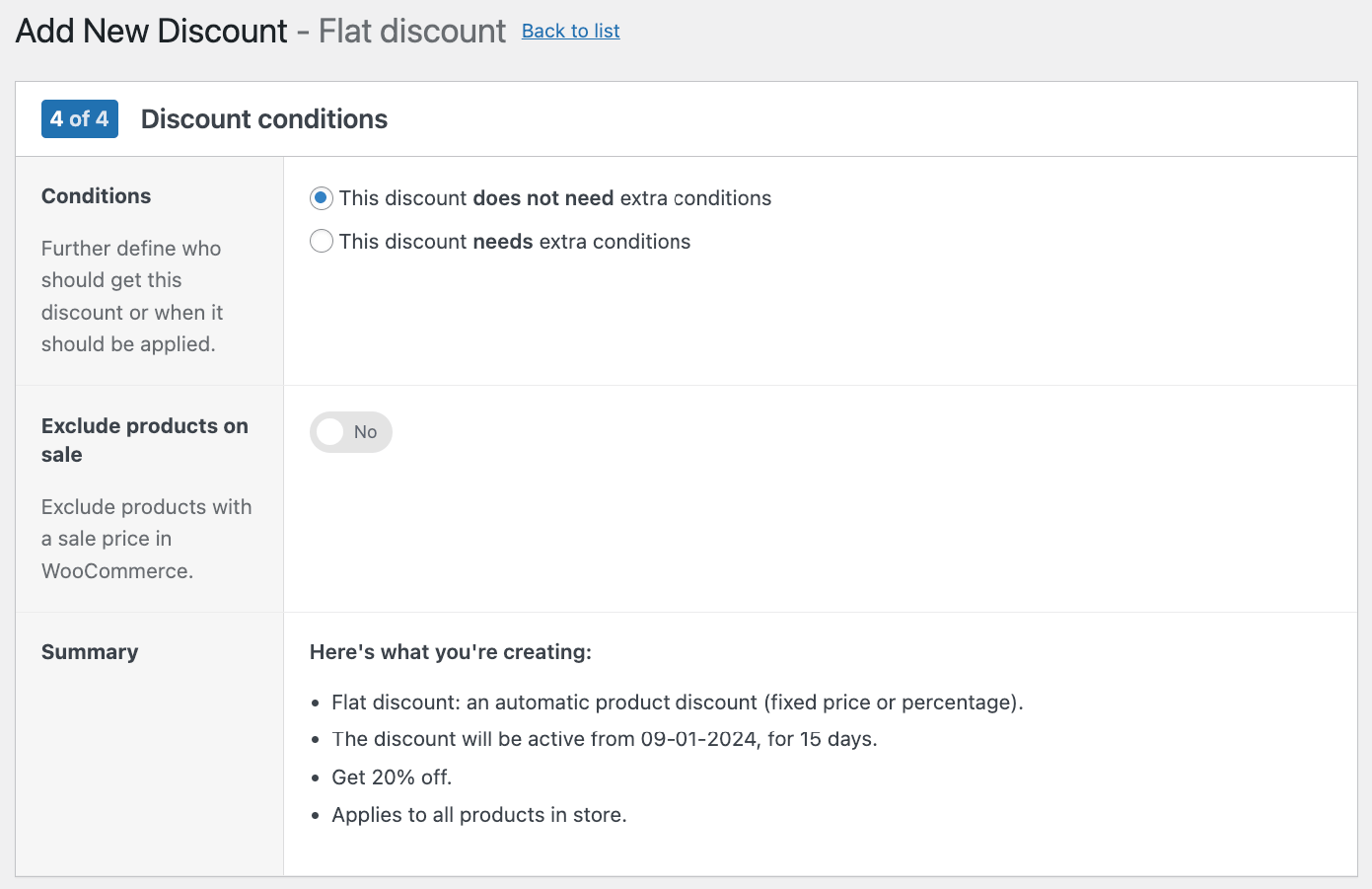
Save your changes, and you’re done!
Once you’ve done this, your discounted prices will automatically apply to eligible products during the specified timeframe, driving sales and increasing customer engagement.
WooCommerce Discounts supports multiple discount types beyond simple percentage-off deals:
- Simple percentage or fixed amount discounts: Apply 20% off or a flat $10 reduction storewide or to specific products.
- Bulk pricing: Tiered discounts based on quantity, like “Buy 3+ and save 15%.”
- BOGO deals: Buy One Get One offers, or variations like “Buy 2, Get 1 Free.”
- Cart-based discounts: Trigger conditional discounts when customers hit spending thresholds, such as “10% off orders over $75.”
- User role-based pricing: Offer exclusive flash sale rates to VIP members, wholesale customers, or subscribers.
For detailed setup instructions, see our WooCommerce Discounts documentation.
Choosing the right products for your flash sale
Selecting the right products is crucial for the success of your flash sale. Consider the following factors:
- Popularity: Choose products that are popular among your target audience to maximize interest and engagement.
- Stock levels: Feature products with sufficient stock levels to meet demand and avoid disappointment.
- Profit margins: Focus on products with healthy profit margins to ensure profitability during the sale.
Additionally, bundling products can increase the average order value, encouraging customers to purchase more items.
When should you run a flash sale, and for how long?
Timing is key when planning a flash sale. Consider the following:
- Seasonality and holidays: Align your flash sale with relevant seasons, holidays, or shopping trends to capitalize on consumer spending habits.
- Duration: Keep flash sales short – ideally no more than 3 days – to create a sense of urgency and exclusivity.
- Global audience: If your audience spans multiple time zones, run the sale for at least 24 hours to accommodate all customers.
- Quality over quantity: Avoid running too many sales to maintain the integrity of your brand and prevent customers from waiting for discounts.
Best practices for promoting your flash sale
Successfully promoting your flash sale requires careful planning and execution. Follow these best practices to ensure your flash sale achieves its objectives and maximizes profitability:
- Set clear objectives: Define measurable and achievable objectives for your flash sale. Determine whether your aim is to raise the profile of a new product, clear old stock, increase orders on seasonal products, or attract new customers.
- Calculate profitability: Evaluate your pricing to ensure the discounts offered are financially viable for your business. Calculate how much of a discount your business can afford while maintaining profitability.
- Create a marketing plan: Identify the most effective communication channels to reach your target audience, whether it’s through email campaigns, social media, or targeted advertising.
- Optimize copywriting: Craft compelling and persuasive copy for your email campaigns and promotional materials. You want to entice customers to buy in your flash sale!
- Plan a realistic timetable: Detail all marketing communications and promotional activities leading up to the event. Allow sufficient time for preparation and promotion to generate interest among your audience.
- Check inventory: Verify that you have sufficient inventory on hand for the items that will be included in the flash sale. Avoid disappointing customers by running out of stock early during the sale period.
- Get organized: Ensure you are well-prepared for the influx of orders during the flash sale. Stock up on packaging materials and establish a plan for quickly and efficiently dispatching orders to customers.
Creating urgency with effective marketing strategies
With flash sales, creating a sense of urgency is key to driving sales. Here are key strategies to infuse urgency into your marketing:
- Countdown timers: Incorporate countdown timers prominently on your product pages and within your marketing materials, such as social media posts and emails. These timers visually signal the limited-time nature of the sale, prompting customers to act quickly.
- Promotional banners and badges: Display flash sale announcements site-wide using header notices, homepage banners, and sale badges on product images. These visual cues ensure customers know about your promotion the moment they land on your store.
- Limited quantity alerts: Displaying stock levels or notifying customers when someone last purchased a product can instill a fear of missing out (FOMO) and encourage swift purchasing decisions. By highlighting limited availability, you create a sense of urgency that motivates customers to secure their desired items before they’re gone.
- Urgent messaging: Utilize urgent messaging throughout your marketing, emphasizing phrases like “While stocks last” or “Sale ends in 2 hours!” This reinforces the time-sensitive nature of the flash sale, encouraging customers to take immediate action to avoid missing out on the opportunity.
- Exclusive offers: Make your flash sale more appealing by offering exclusive deals or incentives reserved only for the sale period. Consider creating bundle deals, additional discounts on future purchases, or exclusive perks for flash sale participants.
- Follow-up communications: Don’t overlook the importance of follow-up communications to remind customers of the impending end of the flash sale. Send timely email reminders or push notifications, especially to customers who have items in their cart but haven’t completed their purchase.
Measuring the success of your WooCommerce flash sale
Analyzing the success of your flash sale goes beyond just revenue numbers. Here’s how you can effectively measure the impact of your flash sale and gain valuable insights for future sales:
- Sales performance metrics: Focus on key metrics such as revenue, conversion rates, and average order value during the flash sale period. Compare these metrics against previous periods to assess the flash sale’s impact on sales performance.
- Stock levels: Analyze stock levels before and after the flash sale to understand product movement and demand. If clearing stock was one of the objectives of the sale, evaluate whether this goal was achieved.
- Customer behavior analysis: Monitor customer engagement metrics such as site traffic, new vs. returning customers, and bounce rates during the flash sale period. This data provides insights into customer behavior and the effectiveness of your marketing campaigns in attracting and retaining customers.
- Profitability analysis: Evaluate the overall profitability of the flash sale by considering factors such as discounts, marketing expenses, and operational costs. Calculate the return on investment (ROI) for the flash sale to determine its financial impact on your business.
Use this data to identify what worked well and areas for improvement. These insights can inform your future sales strategies. By continuously evaluating and refining your approach to flash sales, you can optimize your results and drive greater success for your WooCommerce store.
Your next steps to accelerate profits using flash sales on WooCommerce
Flash sales are a powerful tool for boosting profits and clearing stock on your WooCommerce store. By following the strategies outlined in this article, you can effectively set up, promote, and measure the success of your flash sales. Remember to choose the right products, create a sense of urgency, and use email marketing and retargeting to maximize your results.
As you implement flash sales into your e-commerce strategy, keep in mind the key takeaways:
- Use the Discount Rules for WooCommerce plugin to simplify the setup process
- Select popular products with sufficient stock and healthy profit margins
- Time your sales strategically and keep them short to create urgency
- Promote your sale effectively using compelling copy and targeted marketing channels
- Measure your success using key metrics and use insights to inform future sales
By continually refining your approach and staying up to date with the latest tools and strategies, you can unlock the full potential of flash sales and drive long-term success for your WooCommerce store.
Ready to get started? Download WooCommerce Discounts today!
